Lehr- und Forschungseinheit für
Programmier- und Modellierungssprachen
| Oettingenstraße 67 | D-80538 München |
![[LMU Logo]](ext/LMUlogoFarbe.gif)
| INSTITUT FÜR INFORMATIK Lehr- und Forschungseinheit für Programmier- und Modellierungssprachen
| |
Diplomarbeit
| Beginn der Arbeit: | 22.07.2002 |
| Abgabe der Arbeit: | 12.12.2002 |
| Betreuer: |
Prof. Dr. François Bry Dipl.-Inform. Michael Kraus |
Hiermit versichere ich, dass ich diese Diplomarbeit selbständig verfasst habe. Ich habe dazu keine anderen als die angegebenen Quellen und Hilfsmittel verwendet.
München, den 12. Dezember 2002
While certain aspects of collaboration already take place in current usage of the World Wide Web, no dedicated and integrated system exists to support this kind of collaboration. Instead, existing means of communication are used, which is cumbersome in many cases. The present work is an attempt to develop an integrated approach to collaborative Web usage. The theoretical backgrounds for such an approach are laid out by the terminology and a survey of existing work. Relevant concepts are introduced and an architecture is selected from a variety of options. The feature set for a prototype is defined and that prototype - called teamXweb is implemented. An experiment conducted with that prototype is described as well as a follow-up user survey. Finally, future directions for the approach are discussed.
bookmarks, categorization, collaboration, communication, communities, information sharing, meta-browser, session history, teamXweb, navigation behavior, Web usage
http://www.pms.informatik.uni-muenchen.de/publikationen/diplomarbeiten/Holger.Wagner/index.html
Note: This work has been optimized for being viewed on the Web. If you need to print the document, use the PDF version available at the given URI. If you want to read the document online, use the HTML version also available there.
I'd like to express my appreciation for the very helpful,
continuous and inspiring support of my supervisors Dr. François Bry
and Michael Kraus.
I am very grateful to the following people who helped me conduct
the experiment and user survey in their courses:
Dr. Slim Abdennadher,
Dr. Stefan Conrad,
Dr. Norbert Eisinger,
Tim Furche,
Tobias Kiesling,
Dr. Dr. Castulus Kolo,
Dr. Hans Jürgen Ohlbach,
Dan Olteanu,
Sebastian Schaffert.
Many thanks to Martin Josko,
for installing Tomcat at a server at the University of Munich and
obtaining an academic license of Together Control Center, and
to Robert Hofer for setting up a project server for the prototype.
For the navigation bar and teamXweb logo, many thanks to
Kernzeit GmbH, in particular Robert Erb -
you made teamXweb look cool!
Furthermore, I'd like to thank all the people who participated
in the field test and answered the questionnaires, in particular those
who gave me feedback with general comments, bug reports and feature requests.
In particular, I appreciated very much the conversations with
Sacha Berger and Felix Weigel, who reported a lot of bugs and gave
me many suggestions on how to improve the system.
Last but not least, thanks to my beloved girl-friend and soul-mate
Ngoc-Tram (Noki) Tran, for her love and for keeping me motivated when
I needed it!
The World Wide Web is a rich and complex space for retrieving all kinds of information in academic and commercial contexts. Many people are already collaborating in the effort to use this medium efficiently, but doing so without dedicated technical support. Instead, people are sending URI[Uniform Resource Locator]s pointing to documents they find interesting via eMail, with annotations that are lost when the eMail is deleted. Bookmark collections are manually converted to Web pages and uploaded to the Web - but peers must still be informed about the location of such pages and maintaining them is cumbersome. Some Web pages offer guestbooks, that are then used by an emerging community of people interested in the contents of such pages - but they all have different user interfaces.
The present diploma thesis is an attempt to develop an integrated approach to collaborative Web usage - supporting these forms of collaboration with a software system that integrates features existing distributed among various applications into a consistent concept.
To this end, first, a terminology is laid out, defining the terms relevant to the subject matter. Then, a variety of existing approaches in various disciplines is surveyed and their relevance disussed. These two sections have been included from previous work ([Wagner2002]) with minor stylistic improvements. They provide the fundament for the following chapters.
In the first chapter, the concepts relevant to an integrated approach to collaborative Web usage are introduced: collaboration, communities, Web navigation, communication, categorization and privacy and security issues. Privacy and security issues is a somewhat modified version of a similar chapter in [Wagner2002] and included here for completeness. In the following chapter, the first step towards an implementation of these concepts is taken with the discussion of various options for an architecture for such a system.
With the selected architecture, a set of features is possible, and many of these features have been chosen to be implemented in a prototype, called teamXweb. These features are discussed and the feature set is compared to existing Web browsers. The prototype has been implemented with the given architecture and the discussed features. While in [Wagner2002], the features were still of a theoretical nature, a similar text has been used for the present work - but describing an actual system, which is illustrated by screenshots and a more detailed description.
The prototype is then used for conducting an experiment, which is desribed in the following chapter. Finally, the whole work, including the results of the experiment are discussed and an outlook for the future is given.
An effort to clarify the terminology for the broad area of the World-Wide Web has been summarized in [W3CWCA]. The following terms defined there may be relevant to the present work:
In the present work, a Web user community is defined as a group of Web users that either have "something" in common or explicitely are members of a particular group. A more in-depth discussion of this term is subject of chapter 2.2. Note that in the related work introduced in chapter 1.2.4, a Web Community is defined as a set of related Web pages and has no direct relation to the users who view those pages. In the present work, the term Web content community is used for the latter type of Web communities to draw a clear line between the social user communities and the more technical view on communities resulting from considering Web pages.
Navigation behavior is how particular users or a group of users navigate through the Web. Navigation behavior is an artefact of individuals' or communities' Web usage over time. Two studies that try to analyze individual user's navigation behavior are introduced in chapter 1.2.1. Navigation behavior is discussed more in detail in chapter 2.3. A basic concept of navigation behavior can also be found in chapter 4.2, where the terms navigation events and browsing state are defined.
[Kleinberg99] defines Web graph as the directed graph consisting of Web pages (nodes) and links between them (directed edges). The Web graph can also be seen as some sort of space populated by users, which may be a useful metaphor to support collaborative browsing.
The traversal of this graph performed by users is generally called browsing. In the present work, while users are browsing the Web, they leave behind individual trails that can be accumulated "globally" or for a specific group of users to (community) paths. Note that individual trails and (community) paths can be represented as subgraphs of the Web graph, but other representations (e.g.[exempli gratia], sequences) are also possible.
[Cheung] defines a Web tool as a software tool that helps users to retrieve, locate and manage Web documents. They classify Web Tools into five levels:
| Level 0 Web tool | A software system that “retrieves documents for a user under straight orders.” ([Cheung]): the user must give the document's URI to the browser so that it can retrieve the document. It's not perfectly clear from the source, whether or not following links is a level 0 Web tool capability - but that is assumed for the present context. The common term for level 0 Web tools is Web browser. Note however, that most currently available Web browsers extend the behavior where the user has to instruct the tool where and how to find the documents at least by history and bookmark mechanisms. |
| Level 1 Web tool | These tools provide “a user-initiated searching facility for finding relevant Web pages” ([Cheung]). The most common example are Internet search engines. Current Web browsers often integrate search engines into their interface. |
| Level 2 Web tool | Software systems that “maintain user profiles and have an active component for notifying users whenever new relevant information is found” ([Cheung]) belong into this class of Web tools. The user profiles in this class of Web tools are usually static: the user enters his interests and the system looks for information matching those interests. |
| Level 3 Web tool | A more dynamic and deductive approach qualifies a level 3 Web tool. While for a level 2 Web tool the user needs to be aware of his interests and must be capable of expressing them to the tool, level 3 Web tools attempt to infer the user profile by analyzing the user's behavior. This becomes particularly important as humans are not used to, and usually not capable of formalizing their browsing behavior or information needs because this is not needed in most every day situations ([Chalmers98]). An overview of some of the systems and their theoretical backgrounds is given in chapter 1.2.3. |
| Level 4 Web tool | A level 4 Web tool should have “the capability of learning the behavior of both information users and information sources” ([Cheung]). Designing the architecture for such a tool is the objective of [Cheung]. |
Table 1.1: Classification of Web Tools after [Cheung]
The objective of the present work is laying out the foundation for a collaborative Web tool, which is at least a level 3 Web tool that additionally supports the collaboration between its users. Note that most of the examples given in chapter 1.2.3 are in some ways collaborative as they use matching of different user's profiles for their recommendations. The distinction between such recommender systems and collaborative Web tools is that the former use collaboration implicitely without necessarily letting the user even notice it. The latter, however, should provide means for users with similar interests to explicitely collaborate. For example, by sharing the information they find on a particular search task or making annotations to a particular document available to others.
In the features of the prototype discussed in chapter 4, the attempt to infer the user's profile is not made - instead the system only tracks the user behavior and he must explicitely mark his interests by bookmarking pages. While the concepts are quite interesting to discuss, the actual implementation is beyond the scope of the present work. However, a design goal of the prototype is easy extensibility with features like this and subsequent work may integrate the implementation of level 3 Web tool features.
[Twidale] introduces a few interesting terms concerning (collaborative) browsing behavior:
Tactics for searching information include consulting, which is described as asking a colleague for help but may also be used when strangers are asked for assistance. This has the advantage that the references are already filtered according to the taste of the consulted person. To bibble, is to use other searchers results, for example, published in the form of a bibliography for one's own search. However,
“The results of most searches are not published as bibliographies but are private, local and temporary and consequently, from the perpective of future users, the information is lost. This means that the great majority of searches that are conducted fail to bibble properly; they fail to take advantage of previous results because there is no mechanism to support the sharing of this information.” ([Twidale])
In an informal study conducted at the Lancaster University Library (referred to by [Twidale]) the following collaborative interactions have been observed (which are considered relevant to Web searching): Joint search: small (2-4) groups of students working on a single terminal, involving frequent pointing at the terminal screen. Coordinated search: a group where each participant works on his own terminal, sometimes competing to find the information and sometimes clustering around terminals like in joint searches. Chance contact occurs when people happen to use the same resource and thus get in contact.
“Group searching takes place when two or more people share a common aim, and choose to coordinate their searching efforts.” ([Twidale])
Differentiated group searching expresses that the group members work in the same area, but their specific searching aims are different.
Serendipitous altruism is used to describe the fact that
“colleagues in a community may be willing to help each other's information searching even if they are not directly involved in the project.” ([Twidale])
“If your colleagues know what you are working on and happen by accident, in the process of undertaking their own searches, to come across something that may be of interest, they may altruistically pass the information to you.” ([Twidale])
As the cost for such help must be minimal for the help to be given, a tool for collaborative searching should support serendipitous altruism sufficiently.
In [Twidale], a distinction is made between product-related and progress-related information exchange between people. In product-related information exchange, the search results are discussed, while progress-related information exchange deals with the process of searching (e.g., how to find certain types of information).
There is a large body of literature that deals with different aspects of the Web which are relevant to the present work. The following sections are an attempt to classify that literature and provide the background to this project.
In this section, some approaches of tracking and analyzing the navigation behavior of Web users are introduced and their results outlined. While chapter 1.2.2 presents approaches that analyze server logfiles, this section is dedicated to client-side tracking of Web usage and the analysis of the collected data. The title Analysis of Browsing Behavior may seem applicable to both client- and server-side based approaches. However, server-side based approaches have several limitations so that the general term browsing behavior is reserved for client-side tracking in the present work, while Web usage mining as a more special term is used for server-side tracking. The body of existing work introduced in this section is very small compared to the large field of Web usage mining - in fact, only two studies have been found that analyze and elaborate upon the data collected on the navigation behavior by tracking users at the clients.
However, there has been research on user strategies and usability of closed hypermedia systems preceding the WWW[World Wide Web], which is beyond the scope of the current work, but provided a basis for [Catledge]. In their work, a modified version of NCSA[National Center for Supercomputing Applications]'s XMosaic Web browser is used to capture all user interface level events of 107 users in an experiment lasting three weeks. While there are many other types of user events also included in the study (some specific to XMosaic, e.g., Reload Configuration Files, or Delay Image Loading On/Off), the most important navigation-related user events are following a hyperlink (52%) and the back command (41%). Much less often used are opening a manually entered URI, using the hotlist (hotlist is XMosaic's name for bookmarks) and the forward command (2% each). Opening local files (0.7%), going to the home document (0.5%) and using the history list (0.1%) are found to be the least used features. One possible explanation given for the minimal usage of history and bookmarks is the design of the interfaces to these functions.
While XMosaic does provide a bookmark feature in its interface, many users tended to also use “home pages as indexes to interesting places” ([Catledge]), which provide a similar functionality as bookmarks but better layout control and customization.
A finding on a more abstract level is that users tend to navigate within a small area of particular sites, the individual trails resembling a spoke and hub structure (when using a graph structure where using the back command results in going back to the previous node instead of moving to a new node within a sequence).
Directions for the design of Web sites concluded from the results are that the most important information must be accessible within two to three hyperlinks of the initial home page. Different types of users are identified ("Serendipitous Browser", "General Purpose Browser" and "Searcher", taken from [Cove]) and offering different views of the pages for these different types of users is suggested.
An approach more focussed on users' revisitation patterns and their implications on the design of revisitation tools in browsers has been taken by [Tauscher]. The design of current browsers' history mechanisms is explicitely criticized and an objective of the work is to motivate improved interface designs revisitation tools (within browsers or external, see chapter 1.2.5 for examples).
As in [Catledge], a modified version of XMosaic is used to track the usage data. In fact, the modifications of the earlier study are used as a basis for the latter one, but a smaller set of actions are captured. A distinction is made between navigation and non-navigation actions, where hotlist management (add/delete/edit hotlist entry) belongs to the latter category. There is only one action open URI (making up 50% of the actions executed in the experiments) for the following methods of opening a new page:
Just as in the previous study, the back command is used frequently (30%), and other actions are used seldom (e.g., home (5%), forward (0.8%), new window (0.8%) and open local (0.2%)). It is not clear, why home, back and forward are not included in open URI, as they all result in displaying a new URI. Possibly, this is done because the URI is not selected but taken from stored data the user can not directly access, as in the other actions subsumed under open URI.
A very interesting finding of [Tauscher] is that the same pages are revisited very often, with a recurrence rate of 58%. The recurrence rate is defined as “the probability that any URI visited is a repeat of a previous visit” ([Tauscher]). With the data of [Catledge] that has been reanalyzed in the study of [Tauscher], the rate was even higher at 61%. The conclusion from that fact is that browser interfaces should help users revisiting pages - a few approaches are introduced in chapter 1.2.5.
Even though the recurrence rate is very high, many pages are visited only once (60%) or twice (19%), and many of the visited pages are entirely new (40%). Furthermore, while the major contribution to the high recurrence rate are the last few pages visited (by using the back command), 15% of recurrences are not within a list of the last 10 URIs visited.
Finally, the little acceptance of current history facilities is explained with limitations of the interfaces. In particular, the effort for managing hotlists is considered a problem. Furthermore, histories are usually not easy enough to access and should be integrated better into the browser's user interface.
While studies analyzing browsing behavior as and end in itself are rare, the browsing behavior of users is used for example in recommender systems as introduced in chapter 1.2.3. As an example, [Goecks] has been chosen. The basic idea is that a user's interests may be deduced from certain aspects of his browsing behavior, which allows agents giving the user recommendations of potentially interesting pages based on his usage profile (see chapter 1.2.3 for further information on recommender systems). An innovation of [Goecks] is that mouse and scrolling activity are added as parameters of the user's navigation behavior.
To obtain this information, an agent using Microsoft Internet Explorer 4.0 has been implemented. The agent captures information like the number of hyperlinks clicked on a page, the amount of scrolling the user performed, and whether the user bookmarked the page. No results comparable to those in the previously reviewed studies are available, as the objective of the work was not finding out about the navigation behavior, but using the navigation behavior as input for algorithms analyzing the user's interests.
For the current project, the architectures used for collecting information on users' navigation behavior are quite interesting. Furthermore, the results of the studies concerning the usage of single-user browsers indicate which functions may be necessary for systems supporting collaborative Web usage. While improvements for existing revisitation functions are suggested here, examples are subject of chapter 1.2.5.
The term Web usage mining has been suggested by [Cooley97], as opposed to Web content mining, as a specific variation of Web mining. There, it is defined as “the automatic discovery of user access patterns from Web servers” ([Cooley97]), and in fact all of the work in this category deals with data from Web server logfiles - alternative architectures for capturing the usage data are only theoretically discussed in the survey of [Srivastava], but according to the author's knowledge not used in practice in this field.
The major objective of the work introduced in this section is to provide data for content providers so that they better understand their customer's use of their content. In that, the restriction to server logfiles - which prohibits logging the complete path of a user over multiple websites or gathering specific information about the navigation behavior (see chapter 1.2.1) - does not play a major role.
However, [Srivastava], a recent survey of the existing work in that area, broadens the definition of Web usage mining to include any Web data, allowing proxy and client level data collection as well. This makes sense as many of the techniques proposed in the given papers could easily be applied to client level logfiles even if that application may not have been considered by the authors. On the other hand, a large part of the complexity of Web usage mining is based on the challenge of extracting individual user's trails from logfiles of servers of the stateless HTTP[HyperText Transfer Protocol], a problem that does not arise when the data is captured at the client.
In [Pitkow], some of the problems with server-side tracking are discussed and a terminology is suggested: An unidentified user is defined as a user about whom no information is available. This can be the case when Web proxies operate between server and client. The default type of visitor on the World Wide Web is called session visitor: an identifier can be inferred using heuristics based on the information available in server-logfiles, the Web site topology etc.[et cetera (and other things / and so forth)], or an identifier is explicitely created using cookies. To a certain extend, the former techniques can be used to even identify users behind firewalls, as it was done in [Pirolli]. A tracked visitor is defined as “a visitor who is uniquely and reliably identifiable across multiple visits to a site.” ([Pitkow]) This seemingly can be achieved with long-term cookies. However, it should be added that this does not work when visitors use different browsers on the same machine / user account or different machines / user accounts. Finally, an identified visitor extends the tracked visitor with additional information. To a certain extend, such information can be automatically gathered from other sources - however, the common way is asking the users for that information. Either way the reliability of such information is very questionable unless the user profits of giving valid information.
A major problem with server-side logfiles are the various levels of caching because it distorts the data significantly. If proxies and browsers cooperate, this can be circumvented by a method called cache-busting - this is tried by using HTTP headers indicating that the page should not be cached. If browsers or proxies ignore the relevant headers, cache-busting via HTTP headers fails. A more brutal approach that always works is adding a random dummy parameter to the URI, which causes the browser's or proxy's URI matching to fail and thus inhibits caching. Such techniques are questionable, however, as they interfere significantly with how the Web is supposed to work! After all, there are good reasons for caching and inhibiting this just to get better usage data (which raises privacy concerns in itself) calls for criticism.
For the present work, Web usage mining is interesting because it provides some discussion and formal models for the individual trails users leave behind while browsing the Web as well as some discussion on how usage data can be gathered. Even though most papers of that field deal explicitely with server logfiles, many of the techniques could be adapted to client-side logging, usually in a simplified manner as some of the issues complicating the extraction of valid usage data from server-side logfiles inherently do not exist when using client-side logging.
Recommender systems are tools that recommend Web pages to a user that shall be interesting to that user. While [Terveen] includes recommendation support systems in their broad survey, where the recommendation process is not automated but instead users who want to share recommendations are supported, this section only includes systems that automatically compute the recommendations. Recommendation support systems are instead subject of chapter 1.2.6. The data used to compute recommendations can either be of a single user only, or of a community of users. While the latter implies some sort of collaboration, the focus is on the recommendations, and how those recommendations are computed is usually not visible to the user of the system - this draws another line between recommender systems and collaborative Web usage as described in chapter 1.2.6.
[Terveen] presents a general framework for understanding recommender systems, including what is termed collaborative Web usage in this section. They define content-based systems as using only the preferences of the seeker and attempting to give recommendations based on similarity to items previously liked by that seeker. Content-based systems focus on learning the user's preferences and filtering new items according to those preferences. Examples of content-based systems are [Armstrong1997], [Cheung], [Goecks].
Systems that apply collaborative filtering on the other hand, employ the ratings of other users and try to match those new items that other users with similar preferences have liked. Thus, the recommendation process is completely content-independent. Such systems focus on algorithms that discover similarities between user preferences to match people for gathering the recommendations. Examples of systems using collaborative filtering include [Pazzani], [Rafter], [Resnick1994], and [Wasfi].
Collaborative filtering has been extended significantly by [Chalmers98], by introducing the path model. To capture the context in which a particular information item is used, instead of using only single items, the paths of users (e.g., trails of users on the World Wide Web) are used to build both user profiles and recommendations based on these profiles.
[Claypool] introduces a few problems with pure collaborative filtering: The early rater problem occurs with new items, that haven't been rated by any users. The same applies to new users, that have no profile which can be matched. The worst case of the early rater problem are new systems, where neither users, nor items have any ratings to compute recommendations from.
The sparsity problem plays a role in information domains where the number of items exceeds what individuals can absorb and rate. As this results in sparse matrices containing the ratings of all items for all users, recommendations are hard to compute from these sparse matrices.
Finally, gray sheep are people who do not consistently agree or disagree with any group of people. Gray sheep do not benefit from pure collaborative filtering systems as the system cannot judge their interests appropriately.
Pure content-based systems are criticized as having “difficulty in distinguishing between high-quality and low-quality information that is on the same topic.” ([Claypool]) With an increased number of items in general and for specific topics, this problem gets even worse and the quality of content-based recommendations is reduced.
To solve these problems of pure collaborative and content-based filtering systems, a combination of both is suggested and an extensible architecture introduced. [Pazzani99] further extends this idea by including demographic information into the filtering process, and shows that the quality of recommendations is actually improved by using the combination.
Other work on recommender systems includes [Liebermann] and [Maglio1997]. Both try to obtain a model of how the user searches the Web and give suggestions based on this model.
For the ongoing project, an integration of automatic recommender system technology is a promising idea. While the main objective is helping people collaborate explicitely and provide an increased awareness of other people, the collected data can be used as input for any combination of the introduced techniques of automatically recommending interesting pages. Ideally, the recommendations are explained to the user, as suggested in [Herlocker]. This can further enhance the awareness of the community one browses the Web with.
Another very interesting aspect of recommender systems in respect to the current work is that they usually recognize communities based on the various types of user profiles. While the pure recommender systems need those communities to base their recommendations upon, the communities can also be used to make people with similar interests meet each other. This idea is discussed by [Terveen], including some of the privacy issues involved therein. Furthmore, such explicit communities based on user profiles may even be used to evaluate the quality of the community by asking its members whether they feel the community shares their interests or not. The privacy issues of such a system must be carefully weighted against the potential benefit for the users, ideally in a way that puts the freedom of choice to the user himself.
The body of work introduced in this section deals with analyzing the static structure of the Web defined by hyperlinks and/or content to find out relationships between pages and group pages into clusters, called Web (content) communities. Notice that content analysis is only introduced in connection with hyperlink analysis here. While content analysis surely is a very large field as well, it has been left out for the sake of brevity and may be included in subsequent work. Hyperlink analysis is usually a static approach that does not take into account user behavior. A recent survey of the work in this field and some terminology is given by [Efe]. The simplest and most obvious form of page A implicitely endorsing page B is a direct link from A to B. When a page A links to two other pages B and C that is called co-citation and it is assumed that B and C have some relevance to each other as well as to A ([Efe]). Another measure, also taken from bibliometrics (see below), is bibliographic coupling: the more links two pages A and B have in common, the higher their bibliographic coupling and thus, a higher similarity or relevance to each other is assumed ([Kleinberg]).
One finding of hyperlink analysis is that Web pages can be categorized into authorities and hubs: authorities are considered the best sources of information on a particular topic and hubs are collections of links to those locations (e.g., [Chakrabarti], [Kleinberg], [Gibson1998b]). Discovering these pages is not a trivial task, and much of the work tries to find algorithms that efficiently handle this task. For examples, see [Dean], [Flake], [Gibson], [Kleinberg].
Another interesting link topology is that of a web ring: a set of related pages that link to each other one after the other. Each page n links to a previous page n-1 which in turn links to n, and a subsequent page n+1 which links back to n. Web rings are discovered for instance by the method of [Flake].
According to [Gibson], "link structures have been studied in hypertext research that predates the www", for example in [Botafogo]. A related field are bibliometrics, in which the patterns of citation among scientific papers is studied. A review can be found in [White]. Some of the connections between bibliometrics and hyperlink analysis are studied in [Larson]. A few important differences between scientific citations and Web links are ([Efe]):
For an example where content and hyperlink analysis is combined, see [Davison2000]. While other approaches only include the topology of the links, here the text in, and around the links is used - assuming that it somehow describes the pages linked to. In the experiment it is shown that the text within the anchors often represents at least a part of the target page.
[Pirolli] attempts to improve Web navigation and assimilation by integrating hyperlink topology, page meta-information (like file size and URI), usage frequency and usage paths as well as text similarity between the pages. They have also defined a set of types of Web pages according to their roles:
While previous work concentrated mostly on the communities in themselves, [Toyoda] is also concerned with the relationships between those communities and a way of navigating between related communities. To that end, they have developed a technique for creating a community chart, which is a graph of which the nodes are communities and the the edges relationships between those communities. The edges are weighted, the weight representing the strength of the relationship.
The major objective of this approach is improving the way the Web can be searched, organized and visualized. Another application of the results of such work is more specific targeting of advertisements. If the communities of which the visitors may be interested in certain products are known, the most authoritative pages can be used for effective advertising ([Efe]). Last but not least, finding out about the social and/or intellectual structure of the Web is an end in itself.
In the context of the present work, the results of research dealing with hyperlink and/or content analysis may be valuable to define groups of documents that people look for information at. A user may then communicate with users currently visiting pages from the same group (a Web user community based on a Web content community) which may make it much easier to find the most interesting information by simply asking others. Hyperlink analysis may be extended by using the links actually followed by users instead of all links, and possibly even using navigation behavior information like how much time is spent with a page to improve the quality and relevance of the clusters. Intuitively, a page that a user returns to many times and from which he then visits other pages may be a good hub for the topic the user is currently interested in (see chapter 1.2.1). A page visited from such a hub that the user spends a lot of time with, possibly bookmarks it or saves it locally is probably a good authority.
Work dealing with the creation and integration of user interfaces for revisitation and annotations tools includes [Barret], [Cockburn99a], [Cockburn99b], [Hascoet1999], [Hascoet], [Kaasten], [Koch], [Laurent], [Li], and [Tauscher]. In [Hascoet1999], an attempt is made to integrate a short term history, a personal best of list, a list of unclassified documents to be read later, and an overview of an organized collection of bookmarks into a unified user interface. The model used for this integration, termed "document as user interface" by the authors, can also be used for navigation. While most browsers show bookmarks in a simple tree, BookMap uses a fisheye view that allows zooming in to and out of areas of interest, trading details for context. Another improvement to the handling of bookmarks is filtering - a technique also used by [Kaasten] and [Li]. While the keyword filter is quite simple, a special approach has been developed for filtering by date: instead of entering the dates manually, a slider is used that consumes minimal screen estate (see below). The length of the cursor represents the length of the period, and the position of the cursor represents the period itself.
[Kaasten] deals with an integrated model for "back", history and bookmarks, based on a recency-ordered history list, in order to improve the usability. The "back-button" in current Web browsers is usually implemented as a stack, leading to problems as going back and then branching to another page destroys the old branch. A recency-based history, on the other hand, simply records the pages visited in the time-based sequence they are visited. A recency-based list not only avoids this problem but is also considered more intuitive to the users. While conventional bookmarks provide useful means of structuring the collection, this is considered "heavyweight" by [Kaasten] and a solution where bookmarks are replaced with "dogears" on the list of visited pages is proposed. Like in [Hascoet], pages are represented via thumbnails, as this has been proven to be more effective than Web page titles or the URIs of the pages ([Cockburn99a], [Cockburn99b]). Implicit bookmarks are somewhat similar to the best of list in the above work: by visualizing the page visit frequency a user can easily distinguish between pages that have been visited more or less often. By filtering, best of and bookmarks only lists can easily be created, as well as a simple form of content-based filtering, using the page's title or showing only pages from particular domains.
PowerBookmarks introduced by [Li] is an information organization, sharing, and management tool. It supports advanced query, classification, and navigation functionalities on bookmark collections and also uses users' access patterns for features like automated bookmarking, document refreshing, and bookmark expiration. For example, when a user visits a Web page frequently, it can automatically be bookmarked.
A major problem with revisitation tools is the "screen real estate" ([Cockburn99b]): as the Web pages the user actually wants to see usually require a lot of space on screen, revisitation tools compete with that space. Thus, the more space the tool requires, the more useful it must be for the user so that he does not hide it somewhere and thus stops using it. Therefore, “[r]evisitation tools must [...] maximise the value of the information they present, and do so using minimal screen real estate.” ([Cockburn99a])
[Cockburn99a] also discusses various approaches to the structural organization of page display:
There have been various approaches to annotating the WWW, some of which shall be introduced here. One major design issue with annotation systems is how the annotations are gathered, stored and presented. There are generally two classes of systems: systems that require software installation or configuration changes on the client-side (e.g., [Kahan], [Laurent], [Marais]), and systems that use standard internet technology like JavaScript to embed the functionality in standard Web browsers (e.g., [Koch]). The latter, however, usually requires changes on the Web server or the documents it provides, restricting annotations to pages that are prepared for taking annotations. An alternative is installing and using a proxy-server or similar architecture, where the original pages are rewritten to include the annotations. This approach has been used, but this is not covered here, see [Laurent] instead.
[Koch] discusses the use of an annotation tool in academic courses. In such an environment, the need of enhancing the documents is not a problem as most relevant documents are usually accessible and can be easily changed.
Yawas, the prototype introduced in [Laurent] is a Java and JavaScript based annotation tool that is implemented as a client-side proxy. It works with any Web browser due to its architecture and allows annotating both remote and local documents. Specific texts within Web pages can be highlighted and annotated and those annotations are stored locally, which circumvents privacy concerns. Sharing annotations is possible via import and export functions.
A very promising project is Annotea ([Kahan]), a W3C[World Wide Web Consortium]LEAD[Live Early Adoption and Demonstration] project for enhancing the W3C collaboration environment with annotations. For editing and viewing the annotations, which are stored on special purpose servers, an own Web client is available (Amaya). However, there are also add-ons for existing browsers including Internet Explorer and Mozilla.
A major goal of Annotea is to re-use as much existing W3C technology as possible - consequently, open standards like RDF, XPointer, XLink and HTTP are used extensively. This simplifies extending Annotea and interoperating with other annotation systems. Another interesting aspect of Annotea is that annotations are typed with types defined by the users, allowing classification of annotations into classes like comment, erratum etc.
While other approaches have a particular user interface included, Annotea is user interface independent. Clients can be implemented based on the standard protocols defined by the Annotea project.
Finally, privacy and scalability concerns are circumvented by using multiple decentral annotation servers instead of a single server. This both allows collaboration among multiple users or even user groups (unlike client-side storage) and at the same time assures that the groups using a server can keep their information private.
While annotation tools often are targetted at collaborative work, revisitation tools are usually single-user oriented. Privacy issues pose a major challenge when such information is used for collaboration, but especially small, limited groups where all participants know each other profit heavily from an integrative and collaborative approach to revisitation and annotation in the Web context. While challenging, finding a well-integrated solution for providing such services to a community may significantly change the way the Web is used. Obviously, such an approach should be based on and extend the models used for single-user revisitation and annotation tools.
A good starting point to find out why a tool for collaborative Web usage is needed is [Twidale]. It draws from some findings on how conventional libraries are used by students - namely, often in a collaborative manner - and these findings can be transferred to World-Wide Web usage. One interesting idea in this work is that not only information, but also people are considered an important thing one can search for:
“We believe that browsing for people, their electronic representations or representations of their activities, is a neglected and important area.” ([Twidale])
For a digital library that allows collaboration, the authors propose the following communication aspects:
[Marais] define cooperative surfing as activity of a community of users who cooperatively and asynchronously build up knowledge structures relevant to their group. They discuss design options and describe their own approach Vistabar that supports this activity. The options given include custom browser, browser plug-in, applet, parasite and proxy. A parasite is defined as “an application that attaches itself to another executing application and is able to monitor and control it through a published API[Application Program(ming) Interface].” ([Marais]) These are analyzed according to the following criteria: control over browser, monitoring, persistent presence, own UI, UI integration and extensibility. In their discussion, the two most promising options were proxy and parasite, but as proxies lacked some features they required (lack of control because of caching, browser display cannot be driven etc.), the parasite approach was chosen. Their tool, for which they have coined the term browserware which stands for software components that are both aware of the browser and the user, supports features like a searchable index on all visited pages (based on the NI2 library which is also used by AltaVista), finding similar (related) pages, classifying pages, finding referring pages and associations to real world items via barcodes.
A feature that may be particularly interesting for determining which
sections of a larger document a user is interested in is also explained:
zipping. This is done by determining the sections and subsections
via their tags (H1, H2, etc.) and then allowing
the user to collapse or expand those sections.
For cooperative surfing in the context of [Marais], bookmarks and annotations are supported. An interesting feature concerning bookmarks is that it is possible to store unclassified bookmarks which are automatically classified by the system. Other users may then change the classification if it doesn't fit well.
A more recent, proxy-based approach is discussed in [Cabri]. In that work, synchronous browsing, which includes chat facilities and the like is the main center of attention. An architecture for a proxy-system that supports synchronous browsing is explained after a discussion on the different options: server-, client- or proxy-side. In fact, what is used is a combination of a proxy that also changes the documents it serves and applets that provide the client-side functionality (these are embedded into the original pages by the proxy). The features of the implemented system include user-management, caching pages, modifying pages, informing users which pages other users have retrieved and changing the colors of links that have been followed or that returned errors. An additional feature that may be interesting especially in an academic context is master-slave browsing, which allows one user to have all other users see the pages he selects. This may be also interesting for teams that want to watch each other's sessions simultanuously (of course, it would be a different feature as in this case, one would talk of joining into a session). Finally, images can be wrapped into applets so that they become sort of a shared blackboard, where users can point to areas within the image as well as painting into the image. The performance of the system is shown to be no hindrance to Web browsing.
A broad overview on collaborative Web usage is also given by [Greenberg]. One very interesting finding reported therein is that voice communication is very important for real time collaboration, but has not been implemented by most systems.
[Greenberg] then introduces GroupWeb. GroupWeb is implemented as an own Web browser, which allows some more features at the expense of forcing users to use another browser instead of the browser they are used to. In GroupWeb, master-slave browsing is also supported but here it is even possible to synchronize the scrolling of the page. Furthermore, telepointers allow participants to point to interesting parts of the pages currently displayed. Like in other approaches, group annotations are supported.
In [Dieberger2000], CoWeb, a collaborative Web space is introduced. It allows people to change the content and create new pages easily. Furthermore, discussions are supported. An interesting feature is that access history is visualized so that users can easily find out when other users have been visiting a page. This increases the community awareness. On the other hand, the architecture - a single Web server - limits the scope of the system significantly.
As the objective of the present work is building an innovative tool for collaborative Web usage, the other approaches must be carefully examined and existing ideas must be integrated with approaches that have not previously been considered for collaborative Web usage. An important question to ask is "what is missing in those approaches?" The objective of finding a solution that integrates approaches - generalizing them - may lead to a system that either cannot be implemented or cannot be used, due to its complexity. Thus, a way must be found so that the integration simplifies instead of making things more complicated.
In this section, various concepts that are relevant to an integrated approach to collaborative Web usage are introduced.
Collaboration is the process of multiple people or groups working together with a common goal. For example, a group of scientists working in the same field and sharing the results of their individual research do collaborate. While this could also be called cooperation, the relationship between people involved in collaboration is considered much closer. In particular, while cooperation may take place between competing parties, there's an atmosphere of trust and sharing information in a collaborative environment, and there is much more of a team spirit ([Maxwell]). Therefore, two competing companies may cooperate in the specification of a new standard that both are in need of - but this would not be called collaboration.
This implies an important relationship between the terms that shall be made explicit: collaboration can be seen as a more specific description of working together than cooperation. Instances of collaboration are usually instances of cooperation, but instances of cooperation are usually not instances of collaboration. Therefore, providing a means for collaboration includes support for cooperation as well.
While the difference between cooperation and collaboration is slight and the terms are used interchangeable in many contexts, the difference is important for collaborative Web usage, because the main aspect of working together in this context is sharing information in a very trustful manner. Thus, the attitude of people (or organizations) involved should allow sharing that information, and a system supporting collaborative Web usage may provide less information in an environment where people involved do not trust each other.
Therefore, the difference between cooperation and collaboration within such a system may become apparent by the access permissions granted to the cooperating or collaborating parties. Naturally, cooperating parties would have more restrictive permissions than collaborating parties.
The present work focusses on collaboration in the process of finding and dealing with information on the Web, as opposed to the creation of content for the Web. This collaborative process can be supported with means for efficient communication (see chapter 2.4), as well as storage and visualization of both the path that lead to useful information and the information itself (see chapter 2.3). While visualization is only done in a textual manner in the present work, graphical visualizations of the paths leading to useful information is quite an interesting field relevant to the present work that would have been adressed if more time had been available.
The groups of people that are involved in such collaboration are termed communities in this context. Communities can be created by users of the system, by privileged users (e.g., administrators) or by the system itself (automatically created communities). The people who belong to a community are called members and their status of belonging to the group is called membership. While the most obvious way of determining membership is by explicitely joining or leaving, communities can also be formed automatically.
For example, if users have profiles including data about their interests, they can be matched into communities by matching these profiles. This can help bringing people with similar interests together. The profiles might also be deduced automatically, for example, by analyzing the pages that those users have retrieved (as described in chapter 1.2.3).
Another example are communities of visitors of Web pages. In a way, these communities exist even when they have no members. A person becomes a member of the community of current visitors of a Web page when he enters the page, and leaves the community when he leaves the page. However, he still is a member of the community of people who have visited that particular page in the past.
This leads to the temporal aspect of membership (duration of membership): in some communities, people quickly become members and leave after a short period of time, while with other communities, they remain members permanently once they have joined. Another temporal dimension is the duration of existence of the community: some communities may only exist for a short period of time while others last from the start of the system until the system is shut down permanently. In particular, some communities will cease to exist when they have no more members while others remain.
Finally, membership can be open to everybody or restricted. For example, the owner of a group (or moderator) may have to approve each new member. Another mode of restricted membership is approval of other members (either all, a certain percentage or at least one member).
This section describes various aspects of navigating the Web.
When a spatial metaphor is used, documents in the Web are like places that can be visited. There are a few technical details specific to the current World Wide Web providing a basis for a conceptual understanding of documents on the Web: traditionally, a document is a file on the server's filesystem. This file may consist of various sections and is stored in a folder. Very often, files stored in the same folder also have content that is related. Finally, a Web site resides on a specific domain, and very often, the pages of a domain are also related.
Thus, from a more abstract perspective, the most obvious piece of information is a document: The document is usually displayed as a continuous piece of information (e.g., a page in browser, in which the user may scroll), may be stored as a file on a server or is retrieved from the server through a single request. Within such a document, there are locations (reached by scrolling, could be selected or highlighted - or pointed to via the mouse pointer) and particular sections (often having headlines or names, sometimes accessible through inline links). Documents are related in many ways to other documents. Such relationships between documents include:
Such relationships play an important role when Web navigation shall be understood because they allow viewing the data on various levels of abstraction. Sometimes it may be interesting to know exactly what location of a document most users spent most time on, while in other situations, the focus may be on how users navigate through many documents related to one topic to documents related to another topic.
Some of these relationships are technically difficult to analyze. For that reason, an approach based on technical simplicity (e.g., analyzing the URI string) may be more appropriate than trying to discover and model more complex and potentially more interesting relationships. However, human users may often have a good intuition about relationships that could hardly be discovered automatically. In a collaborative system, such intuition could be collected and used to enhance the experience for all users.
As reported in chapter 1.2.1, the most common navigation action is following a link. In the common environment (at the time of this writing), where Web content is usually viewed on desktop computers, a link is followed by pointing to a marked area within the visual representation of the document, and clicking. The Web browser then usually replaces the current document with the document the link points to. As mentioned in the preceding section, this also implies a relationship between the two pages involved. With the current Web which is based on HTML[HyperText Markup Language] and therefore the relatively simple hyperlink model of HTML, that is actually all there is to say about links.
However, another finding presented in chapter 1.2.1 indicates that the unidirectionality of the HTML hyperlinks is rather unnatural: namely, the frequency of usage of the back button. The existence of the back button in every browser already indicates that moving backwards to the origin of a link is a very important action in Web navigation and thus needs to be modelled. The fact that the back button is one of the most frequently used navigation actions also indicates that users do have a concept of "moving backwards" on the Web, even if this concept is not a part of the underlying hyperlink model.
Another shortcoming of the HTML hyperlink model is that it does not explicitely define the action that the user agent is performing as a result of the user activating the link. While originally, the current page is simply replaced with the destination of the link, it may also be that the content of another frame or window is replaced, or a new window is opened, in which the target is displayed. Other possibilities are jumping to another section in the same document (possible in HTML, but not explicitely modelled) or adding the contents of the target in the current document at the location of the link. Furthermore, the user may choose to open a new window for the target as well as just storing the target to disk, or any other of the previously mentioned behaviors.
Even though better hyperlink models that contain such functionality do exist (for an example, see [XLINK]), these are currently not very broadly used on the Web, which limits the usability of an application relying on these advanced models significantly.
Finally, a user may also choose to manually enter an URI that shall replace the currently displayed page (or be displayed in a new window). In this case, the new document is usually not related to the previously displayed document - however, such an action may also be seen as following a hyperlink.
Another concept that is somewhat related to findings in chapter 1.2.1 is that of a session history. From the fact that the recurrence rate has been very high in the experiments mentioned there, it can be deduced that the documents a user has visited are very important, and it may follow that the same applies to documents visited within a community of users with a common goal.
A user's history is the sequence of navigation actions the user has performed while browsing the Web. These navigation actions can be accumulated in sessions. There are a few natural attributes of sessions, including:
Furthermore, the user may add information to the session to make it more useful for later reuse and finding it among a large number of sessions:
The actual history (i.e.[id est], what the user did during a session) can be stored in many different ways and it seems that there is no unified approach that suits all needs perfectly. Five approaches shall be outlined here:
For a more in-depth discussion of user sessions and browsing contexts see [Kraus].
The session history is always recorded passively, without user interaction. However, for privacy reasons the users should be given the opportunity to switch history logging on and off and feedback should be provided about the state of history recording. For information on whether this feature is implemented in current browsers, see appendix B.
A format that could be used for user sessions is [LOGML], which is based on [XGMML]. However, this format does not provide means to capture the user actions and thus would have to be enhanced significantly for this purpose.
While the session history is recorded passively, without user interaction - and thus, there will usually be a lot of useless information recorded - bookmarks (also known as favorites or hotlists) are actively created by the user when he has found a page he finds interesting and that he thinks he wants to revisit.
Aside of the location of the document that the bookmark represents, further information may be useful for later retrieval:
One problem that occurs in multi-user-environments is that of identity: with a single user, the identity of the bookmark is simply given by the document it represents. With multiple users, however, there may be different additional information, so that either some concept of ownership needs to be implemented, or multiple instances of bookmarks to the same document need to be stored (and the relationship between them somehow needs to be stored as well).
While bookmarks are usually stored separately from the history, having bookmarks that are connected to the history might provide some additional context which can be helpful. However, as this is further additional information making the bookmark much more specific, the problem of identity becomes even worse unless it is again defined by the document (that is two bookmarks pointing to the same document are considered equal).
In a system that supports collaborative Web usage, multiple types of communication can be thought of. The first important dimension to consider is asynchronous vs.[versus] synchronous communication. In asynchronous communication, the recipient receives the messages independently of the sender, possibly at a much later time. Sender and recipient need not be online simultanuously, and messages are stored persistently. Typical examples are mail, eMail, newsgroups and fax messages. A message on an answering machine is also a piece of asychronous communication.
With synchronous communication on the other hand, all the participants of the communication need to be present at the same time. Messages are received instantly and usually responded to quickly. A typical aspect of synchronous communication is that it is less structured than asynchronous communication, and the messages are usually much shorter. While asynchronous communication must be stored persistently by principle, most synchronous communication is not even suitable for being stored for later review due to its lack of structure. In fact, if such synchronous communication is stored persistently and made accessible to future recipients, it automatically becomes a form of asynchronous communication. Examples include face-to-face conversations, phone conversations or online chats.
Another important dimension is moderated vs. unmoderated communication. While the common form of communication is unmoderated, an intermediate moderator can improve the quality of the communication by filtering messages that are not appropriate for the given context. Such a moderator may be a human being that gets messages for review, but it could also be a software agent that filters messages, for example if they contain certain keywords. Moderated synchronous communication may have sufficient structure and quality to be stored persistently and thus be reused as a form of asynchronous communication.
Another important question concerning communication is whether it's one-to-self, one-to-one, one-to-many or many-to-many. For the present context, storing notes is also considered communication. That is the first case: one-to-self. These are messages that only the author of the message reads. While such communication is usually referred to as notes, considering this a special case of communication provides a good basis for integration of originally different things. A more typical form of communication is one-to-one, where two people communicate with each other. These two forms of communication can be considered non-public. Private chats or eMail are typical examples.
If there is one author and many recipients, with no or limited possibilities of the recipients to give the author feedback, that is called one-to-many communication. An example within the context of a system for collaborative Web usage are notes stored on Web pages, that are publicly visible. A more general example is the publishing of Web pages itself.
A typical example for many-to-many communication are mailing-lists or newsgroups. Within the given system, communication within communities will usually be of that nature.
Finally, and partly related, is the scope of communication. While in one-to-self and one-to-one, this is restricted by the type of communication, the information from one-to-many and many-to-many communications may be accessible to few or many people. For example, an annotation on a document is usually an instance of one-to-many communication. However, it may be visible only to a certain community or to all visitors of the document. In this respect, one-to-self communication can be seen as a special case of one-to-many communication, where the scope is only the author himself.
In a system for collaborative Web Usage, categorization plays an important role in many of the subsystems. A very good way to keep bookmarks usable is putting them into categories. If the number of communities exceeds a certain threshold, only categorization of communities will help the user find a community he is looking for (or finding out that community does not exist). Finally, if messages are stored persistently, communication will be much improved by allowing the user (automatically) putting the messages into folders, which are in fact again: categories.
A particular problem that has to be solved in a multi-user environment is that there may be a lot of categories, possibly too many for a single user to keep up with. Furthermore, often there are different ways of categorizing the same things - often more a matter of taste than something that can be decided once and for all. Thus, a mechanism is needed to reduce the cognitive overload with too many categories for a single user while still allowing every user to access every category if they need to. In particular, if different ways of categorization exist, it must be possible to have the coexist without confusing users.
A solution to this problem is keeping a general tree (or possibly a general graph) that includes all categories of all users, and user specific views that include only a subset of the general tree. If a user adds a category, he needs to decide where it belongs in this general tree (that is, which is the parent category of the new category). Thus, consistency is assured as it is not possible to add categories without awareness of the context (unfortunately, this does not prevent users from accidentally or intentionally putting categories where they do not belong). It may be useful to allow the same category having multiple parent categories (breaking up the tree structure into a more general graph).
This general tree may grow to any complexity. For each user, however, there is a subset of this general large category tree, that only includes those categories that the user is interested in.
From the perspective of datastructures, this means that in addition to the general tree, the user configurations need to be stored. The user specific tree configuration does not contain any categories - only whether or not a category from the main tree is displayed below a specific parent category. It is important, however, that it is not only possible to hide subtrees, but also paths. That way, it is possible to hide a complex structure while still providing access to a category anywhere within that structure.
Furthermore, the items stored under a given category C may be visible to its parent category D if C is hidden (inheritance of a category's items to its parent category). That way, all items are always available. However, hiding items with their categories must also be possible (this depends on the particular use case).
With such a special tree, additional actions are required, while in common trees, there are only three interesting actions: select an item, show children and hide children. For the multi-user-tree, the following additional actions need to be defined:
For the usage of such a categorization in a system for collaborative Web usage, it may be useful to allow users using the view configuration of their fellows. That way, they can profit of the effort others have put into customizing their categories.
Furthermore, default profiles could be provided with communities, so that each community could have its own categories while still being compatible with both its members's categories as well as the global set of categories (of which the member's categories are a subset). That way, a user could choose between the personal profile of himself or one of his fellows, and a public profile of one of the communities he is a member of.
Future work may elaborate further on this, as researching this new approach to community-trees was not a priority of this thesis.
As the system is intended to capture a lot of information of and about its users, privacy is a major concern. In this section, the problem is generally discussed without going too much into details or solutions of the problems introduced. Privacy and security form an own scientific discipline which lies beyond the scope of this work - the section is included to point out the relevance of this discipline to the present work.
While a maximum protection of privacy may be an important criterion for many users (see [Pitkow]), this conflicts with the intention of making the Web more personal and support collaborative Web usage. Thus, the challenge in this issue is balancing the protection of privacy with the display of personal information. One dimension of this is how much data is available about each user to which other users. [Terveen] suggested letting the users progressively reveal more about themselves, while they get to know the fellow users better (this is common practice with dating services).
Another, but more fundamental, dimension is the architecture of the system, which has a major effect on the applicability of privacy concerns. If data is captured and stored on the clients alone, private data stays on private computers and as long as no one gets access to the computer, no privacy problem arises. This approach has been followed for instance by [Laurent]. However, collaboration can only take place if users exchange their data via other media (e.g., eMail or Web pages) - which is cumbersome in this approach. In fact, such a system does not support collaboration by itself, at all.
A better solution is capturing and storing the data at some place that is only accessible by the team involved in collaboration. That way, the team members can only access other team members' data. Of course, the team members must have a trusty relationship. In this scenario, privacy issues do arise - however, it is an environment which is relatively easy to control and find consensus in, about measures against misuse of the data. A disadvantage is that team members can only use the system within the given boundaries.
The most challenging architecture is a system that can be accessed from anywhere on the Internet. This does have some advantages: teams may connect from all over the world, users can use their accounts from all over the world - a lot more people use the system and thus a lot more information is available. Some possible features (e.g., collaborative filtering or synchronous communication with people on the same Web page) only make sense or even only are possible with a very large user base, which can only be attained in such an environment. However, privacy issues become a major concern with that architecture. Not only must it be secured well against hackers which may steal and misuse the data (which is much harder when the system resides behind a firewall). The intended usage is also problematic, as most users will not know anything about the other users.
In [Bellotti], a very useful design framework is given, which is based on control and feedback. Users should be able to control what information about them becomes available to which other users and when information is being captured, the users should be provided with feedback on this. A system for collaborative Web usage must implement mechanisms that allow its users to control all data that becomes available about them. To a certain extent, forcing a user to explicitely grant other users access rights already provides him with feedback about what others can find out about him. Further feedback (e.g., if someone actually views the available information) is probably not needed unless users forget about their own settings after some time.
This section illustrates that the architecture plays a major role when privacy and security concerns shall be discussed. In fact, there are many ways to build a system for collaborative Web usage, and depending on a chosen architecture, sets of features are possible or impossible. Therefore, the next section deals with possible architectures of which one is chosen. After that, a set of features for a prototype built on that architecture is discussed.
This sections discusses the options for an architecture of the system. There are basically two logical units for which decisions have to be taken. The first logical unit is called server, as it is responsible for collecting, keeping and distributing the data required for collaboration. The major criterion such a server must satisfy is the ability to collect data on where on the Web a particular user is currently located. This also includes the ability to create a history of the user's action on the Web. Keeping and distributing the data is much simpler and much more common to servers, and thus needs less attention.
The second logical unit is termed client. Depending on the choice made for the server, there may be no particular criteria for the client - in fact, some of the server centric options require no particular client implementation at all. However, data can also be collected on the client - and it turns out that this is even much more useful. In that case, clients can implement the required server functionality which leads to peer-to-peer systems. However, peer-to-peer architectures are included in the server centric approaches as the implemented functionality is typical for servers.
If a client centric approach has been chosen, the major decision that must be taken is how that client is technically implemented. Among other things, the client must implement common browser functionality, and thus a few possibilities to achieve that are introduced.
A major design goal is to make using the system as easy, comfortable and unobstrusive to the user as possible. Furthermore, the current location of the user on the Web needs to be determined exactly. The current location is required for any functionality where users who concurrently browse the Web shall collaborate (e.g., synchronous communication with people on the same Web page or Web site).
As system architecture is much easier to understand with visual illustrations, most options are discussed based on deployment diagrams from the UML vocabulary. UML has been chosen because it is the de facto standard for expressing system architecture and the vocabulary is simple but still sufficient for the given purpose.
Some of the following approaches (except peer-to-peer and metabrowser) are also discussed in [Marais], [Cabri], [Pitkow], and [Srivastava].
Firstly, four options are introduced, which can be considered server centric. That is, a perspective is taken where data collection is seen from the server. This perspective has some implications on the solution which will be discussed at the appropriate place. A more client centric perspective is subject of the following section.
As all Web servers store access logfiles, which could be used to infer usage data as described in chapter 1.2.2, locating a server for the system right on a Web server comes to mind. This may also simplify storing, manipulating and including annotations to the documents, as they are easily accessible on the location where they are stored, a reason why some of the solutions introduced in chapter 1.2.5 follow this approach.
As figure 3.1.1 illustrates, in addition to the HTTP server the components required for the functionality of the collaboration system are installed on the Web server machine. No modifications are required on the machines of the users of the system.
Figure 3.1.1: Illustration of Locating the Server at the Web Server
The major limitation of this approach is that it can only be used with a very limited part of the Web - namely the content that is served by the Web server where the system is installed. While this may be acceptable in certain environments (e.g., students participating in a lecture, where collaboration is only supposed to take place concerning the lecture materials stored on the server), it does not fit the decentral nature of the World Wide Web. Even in the environment given as example in the previous sentence, this limitation becomes apparent as soon as the lecture material links to pages on external servers.
One possible extension to this approach would be a system that can and will easily be installed on many different, possibly related Web servers. If such a system would reach a certain acceptance and be spread widely on the Web so that many servers accessed (e.g., Web servers of many Universities) do in fact support this kind of collaboration, the limitation would be overcome. However, it is not very probable that such acceptance is reached. Administration of Web servers already is a complex task, and adding such a system would probably be vetoed by most server administrators. This would be a Web server based approach enhanced with peer-to-peer services as discussed in chapter 3.1.3.
Finally, the data collected in logfiles may not be sufficiently exact concerning the current location of users on the Web. For example, if a user clicks the back button, he leaves the document he is currently visiting, without notification to the server. Thus, the server still treats the user as if he still was on that page (e.g., show the user as a current visitor, potentially send messages from a chat about that page to the user). Even worse: The previously viewed document is usually recovered from the browser's cache, so the server is not notified with the new location. This would prevent any sort of synchronous collaboration taking place on any of the documents (the original document as well as the document reached by clicking the back button), and the problem occurs with documents cached at the browser as well as with documents cached at an intermediary proxy.
In this approach, instead of having the components of the system on one Web server, they are located on a proxy server. This solution has also been used for annotation systems as described in chapter 1.2.5. It removes the major limitation of the previous approach because all documents retrieved through the proxy (that is all documents the user retrieve) are automatically included, not only those of a specific Web server.
The architecture looks quite similar to the previous approach as can be seen in figure 3.1.2.
Figure 3.1.2: Illustration of Locating the Server at an Intermediary Proxy
While in the previous approach all users accessing the given Web server could take advantage of the installed system, in the proxy-based approach only those with access to the proxy could use the system. Whether or not this is an advantage depends on what the system shall be used for:
If collaboration shall take place among a group of people that accesses the Internet from a company behind a firewall, for example, and all the people who shall collaborate are behind that same firewall, the proxy can also be installed behind the firewall. That way, the users and their data are protected from access outside of the firewall, which is a major increase of privacy and security.
However, if people from different locations and networks need to collaborate, this may be a restriction. The system could be installed accessible from anywhere on the Internet, so theoretically, the problem could be solved. However, if some of the users are behind a firewall that allows accessing the Internet only via its own proxy, they cannot use the system at all.
Another disadvantage of this approach is that the Web browsers of clients must be configured to use the proxy, and just like with Web servers, many of the events that may be interesting cannot be captured (e.g., usage of the back button). While there is no caching of documents on other proxies (if there are no additional intermediary proxies between the collaborative proxy and the client), the problem with browser caches remains and therefore, the current location of the user cannot be determined with sufficient accuracy.
While in peer-to-peer systems, no dedicated server exists - and thus this option may be expected in the following section (chapter 3.2), it is located here because it deals with distributing the data and can be used as an extension to the previous two approaches. Furthermore, it is seen as the complementary of the independent server introduced in chapter 3.1.4.
In the peer-to-peer approach, the data is distributed among many nodes and each node only stores the data it is responsible for. In the diagram shown in figure 3.1.3, this is the data specific to a user - as the peers are the user's clients, located on the user's machines.
Figure 3.1.3: Illustration of a Peer-to-Peer Architecture
A similar architecture can also be used to overcome some of the problems of the previous approaches. For example, if many Web servers are enhanced with a system for collaboration, the collaboration systems may communicate and exchange data about the communities, users, and so on. If a user moves from one Web server, to another one, the systems may keep track with the user and thus assure continuity in sessions that exceed the boundaries of a single system.
If many proxies would interact in a peer-to-peer-like manner, they might be configured to pass firewall boundaries that users are not allowed to pass (e.g., the systems may communicate via HTTP, possibly through firewall-proxies). Each node could be responsible for the users accessing the Internet via that node, and that way, users from different domains may collaborate.
In summary, the peer-to-peer architecture can be used on different levels, enhancing approaches that are very limited otherwise.
One disadvantage is that such a system is much more complex than centralized systems. For example, if there are only systems installed at the clients, these systems somehow need to find out about their peers. One way of achieving this - which may also be interesting from the privacy and security perspective - is only allowing access to and from other systems that the user has explicitely given to the system. For example, a user A might enter the IP adress of a peer system (of user B). User B then gets notified and has to grant access permissions to A.
A more comfortable solution is having a mediator server that all clients register with, as shown in figure 3.1.3. Clients only need to know the mediator server and can then provide the user with information about all other users registered with the same mediator server. This improved comfort comes at the price of less secured privacy because the mediator server may store information about its users. Even if that information is just that a collaborative system is installed on the given client, special care must be taken that no private data is stolen from the client itself.
If such specialties are taken into account, peer-to-peer systems may however be the best solution to ensure privacy. No personal data needs to be stored on central servers, and the data may only be sent to other systems when the user explicitely allows sending the data. If it was not for time constraints concerning the implementation, this would be the preferred option from the server perspective. For pragmatic reasons, the architecture is based on the much simpler solution: a single independent server.
The option complementary to the peer-to-peer solution is an independent server. Such an independent server centrally collects, stores and distributes all data relevant to the system. As such, it may be a major concern to people worrying about their privacy. However, the independent server is much easier to implement and has none of the disadvantages given for implementations on proxies or Web servers, except possibly the problem mentioned with firewalls in chapter 3.1.2.
The basic idea of that architecture is illustrated in figure 3.1.4, and close inspection of that diagram also shows the major limitation of that approach: an independent server on its own has no means of collecting Web usage data. While with proxies and Web servers, the data is accessible at the server itself, an independent server is dependent upon a component that feeds it with data on the current location and/or history of its users.
This again illustrates how the independent server is on the same abstract level as the peer-to-peer solution, which is more general than Web server and proxy based approaches. The independent server could get its usage data from modified Web servers or proxy servers. The actual system would then reside on the independent server, while the modifications on Web or proxy servers are minimal (e.g., letting the independent server access the logfiles).
The preferred solution - due to the restrictions in Web server and proxy based approaches, however, is that already shown in figure 3.1.4: a component residing on the client, which collects the data and sends it to the server. While this answers the question, who is responsible for collecting, storing and distributing the data (the independent server), a new question needs to be handled: how is this data collected on the client. This is the subject of the next section.
Figure 3.1.4: Illustration of the Architecture with an Independent Server
If data is not collected on a Web server or proxy, it somehow needs to be collected on the client. Four options of how this can be achieved are discussed in this section.
A custom browser implementation would be the solution with the best possibilities of capturing data and integrating the various aspects of collaboration. The browser could communicate with an independent server as shown in figure 3.1.4, or implement a peer-to-peer communication model as shown in figure 3.1.3. All features could be provided under an integrated user interface tailored specifically to the purpose of collaborative browsing on the Internet.
A very obvious disadvantage for the users, however, is that they have to install a new piece of software (which may not even be possible in certain environments) and they also have to learn using that new software. If they have a favorite Web browser, they are unlikely to change their habits and use a new system instead.
Furthermore, implementing a custom browser is a very complex and challenging task, which is way beyond the scope of the present work. Rendering HTML is a very complex task already, let alone handling of scripting languages, style sheets and providing an interface for commonly used plugins. Furthermore, the Web is a very quickly evolving technology, and thus a custom browser would have to be updated regularly to keep up with these changes. Even though external components could be used implementing some of the features, a complete browser still requires a lot more time than is available (and some of these components are quite expensive).
The implementation effort is significantly reduced by only implementing the additional functionality the collaborative system requires as a browser plugin. This also solves the problem that users would have to learn a new interface.
One disadvantage of the previous approach remains, however: installation on the client is required, and this may not be possible in certain environments. Furthermore, browser-plugins are usually just for enhancing the types of media that can be viewed with the browser. A system for collaborative Web browsing may require access to the browser which the plugin interfaces do not support (e.g., persistence over multiple documents).
One very interesting option has been used by [Marais] (see chapter 1.2.6). The idea is accessing a browser (e.g., Netscape or Internet Explorer) via a published API. This provides more control than using a plugin, and it is much easier to keep a persistent state over various sessions. Basically, the browser could be used for rendering the HTML pages and the collaborative features could be implemented by the parasite.
One major problem with this approach, however, is that such an API must be supported both by the operating system and browser implementation. While such an API is available under recent versions of Windows, it is proprietary and may change in future versions of the operating system. Furthermore, restriction to the Windows platform is not acceptable because in the academic environment where the system is tested, Linux is much more common. Therefore, this option is also cancelled.
A new approach is needed, as all the previous options are either incomplete or fail to meet the criteria: ease and comfort for the users of the system and exactly determining the current location of the user in the Web. This approach will be described much more in detail, including some specific technical issues, because the approach implies some (technical) questions which must be answered before the approach can be accepted as the preferred solution.
The idea is to implement the user interface of a Web browser in HTML and JavaScript on top of any common Web browser, the Web pages making up the user interface being served as a Web application by an independent collaboration server. Thus, the user can use his favorite browser and needs not install any additional software. However, as the HTML user interface replaces the user interface of the Web browser, all browsing events can be captured. The user can easily choose between tracked sessions and non-tracked sessions by simply opening a new ("clean") browser window for non-tracked sessions.
To start a tracked session, the user only needs to open a start-page, which can easily be bookmarked. This start-page is served by the collaboration server which also acts as proxy for the content relevant to collaboration. After logging in (which is required for the collaboration features), the system is started by opening a new browser window and loading a special frameset that mimics a browser's user interface, as described below.
The architecture of such a system is shown in figure 3.3 (1). Note that the proxy-server component is called page processor in the system, as its main responsibility is processing the documents (it also retrieves and forwards them, just like a proxy, but this is not what makes this component special).
By using HTTP as communication protocol between client (meta-browser) and server, there are also no problems with firewalls. Even if HTTP proxies are located between the Web browser and the system server, no problems are to be expected as the whole Web application is served via standard HTTP - just like any other set of Web pages. If a user decides that he will use the system as default, he can use the system's start-page as the browser's home page. While common usage of the system does not require any browser configuration, setting a new home page can be seen as configuration effort - but it is simple and optional.
Figure 3.3 (1): Illustration of the Meta-Browser Architecture
The presentation required for browsing is simply a browser window without any navigation controls containing three frames. The upper, fixed size frame contains a combination of HTML and JavaScript to model the navigation user interface of the Web browser. This will be referred to as navigation frame. It includes: a textfield for entering URIs, back and forward buttons, a button for opening new windows and bookmark controls (adding bookmarks, opening bookmarks etc.) and controls specific to the system for collaborative Web usage (e.g., for organizing communities, accessing communication features and logging off). The center frame contains the actual content of the Web pages viewed by the user. It is referred to as content frame and may contain any number of sub-frames, depending on the actual Web content. The content frame is equivalent to the area of a normal browser, which is used to display the Web documents. Finally, there is an orientation frame in the lower part of the window. An example of what such a meta-browser may look like is given in figure 3.3 (2).
When the user clicks on a link in a document, instead of directly sending the request to the original server, a little JavaScript method is called which does the following:
This behavior is transparent to the underlying Web browser and its user.
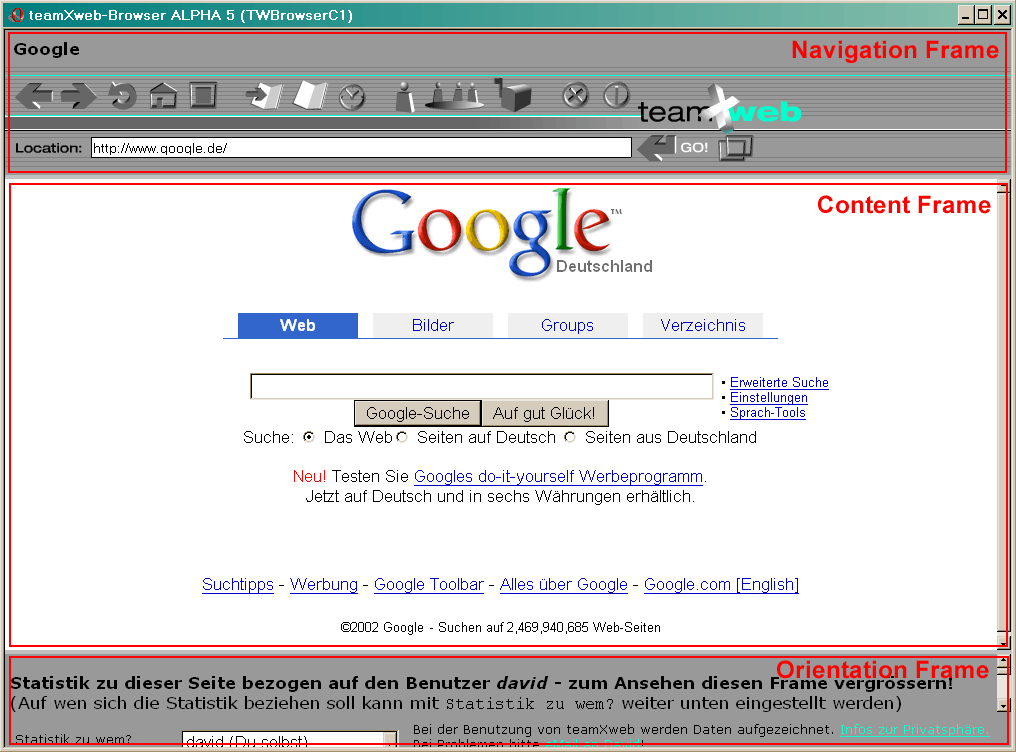 |
Figure 3.3 (2): Screenshot of the Meta-Browser within a Browser (Opera)
To allow the user opening the link in a new window, an icon displaying a window can be added behind the actual link. When the user clicks on the icon, an new system-window is opened, displaying the requested document in its content frame. Another option that may work with some browsers is modifying the popup menues via JavaScript.
This solution has another major
advantage: only the linked HTML-files go through the page processor,
reducing server-load by using a more distributed approach
(unlike a custom proxy-server implementation which might run
into performance problems).
The URIs of resources like images and sound files are not rewritten and
thus directly loaded from the original server.
However, with the same architecture, features like blackboard capabilities for
images could be implemented by extending the page processor so that
it handles <img> tags to provide
blackboard capabilities as it was done in [Cabri].
Obviously, special care must be taken when pages with frames are displayed.
For example, a page that should be displayed in a subframe cannot be
handled by simply putting it into the content frame because that would
destroy the frameset. Also, links in the content that
close the frameset by using "_top" would destroy the
navigation frame, if the target was simply forwarded.
If new windows are opened, they must be wrapped into our system so that
tracking does not break.
However, this approach also allows bookmarking any state of such a
frameset, which is a major advantage compared to browser's bookmark
capabilities.
Furthermore, while framesets usually have a single title for all states,
the system allows changing the title while browsing within the frameset
(e.g., the original title plus the name of the hyperlink the user
clicked on).
The major limitation of this architecture is that not all Web pages are suitable for being modified in the required manner. In particular, Web pages using JavaScript, Java, Flash or other non-HTML based approaches for navigation. While with JavaScript - at least in theory - rewriting the relevant URIs and parts of the JavaScript code may be possible, the binary formats of Java and Flash make this more or less impossible. As the system is targeted to an academic environment, where such navigations are expected to be less common than in the commercial parts of the Web, this shortcoming is considered to be outweighed by the advantages.
Another open but less serious problem is how links from external sources (newsgroup articles, eMail) are handled. If the user copies the URI into the location field, it works - if the user directly clicks on the link, it does not work. For this, drag and drop of hyperlinks would be a desirable feature. Even better would be integrating a newsreader and eMail-client into the system - but that is beyond the scope of the present work.
A very detailed description of the implementation of this architecture is subject of appendix A.4.
In this section, the features of a system called teamXweb are described. teamXweb is a prototype that is used in experiments to find out about the usability and usage of a system to support collaborative usage of the Web. These features were originally defined in previous work ([Wagner2002]), this updated section describes the actual implementation.
The original name of the prototype was TeamWeb, but a search for the term TeamWeb on Google [http://www.google.de] returns about 5,000 pages. With the keywords TeamWeb, Web, usage and cooperative respectively collaborative still 7 respectively 12 hits are returned, three of the latter sample are pages of the original project's Website, though. The other hits link to organization's Web teams that are responsible for the organization's Web presence, independent Web design companies, Web sites about Web design. NetObjects has an architecture called NetObjects TeamWeb™ which is used to support collaborative creation of Web sites [NetObjects].
Thus, the name has been changed to teamXweb, the X indicating that this is meant as the cross-product of team and Web. The new name seems to be unique - at least a search on Google [http://www.google.de] returns no results, which is a very reliable indicator that the term is not used at all, anywhere on the Web. The pronounciation remains the same, however - the X is silent...
The key concept for teamXweb are communities. The term community has been chosen instead of group to point out the broader sense in which the term can be used. A more in depth discussion of communities was subject of chapter 2.2. In the prototype, communities are implemented as simple groups of people, and thus the term is used interchangeably in this section.
Communities are sets of people, for instance a team working on a particular project. Such groups can be created by users, and other users can join or leave the group at any time. For enhanced security and comfort secret groups are added, which can only be joined if their name is known and are not displayed in the community overview. Furthermore, it is possible to close groups (i.e., make it impossible to join or leave the group for all users). However, the community may still be visible to others. Finally, subgroups are only visible to members of their parent groups. This allows a sort of hierarchy, and in conjunction with the closed groups, a certain flexibility to partition the user base, which is also a useful feature for the experiment.
Another type of community in the prototype are Web site respectively Web page related communities. Such communities exist for each Web site and Web page, and users automatically join and leave these communities when they enter or leave the Web site or Web page in question. Using communities for this also allows using all the features available to communities for Web sites and Web pages - in particular communication (see also chapter 4.4) and community statistics (i.e., who is currently a member, who was a member before, see also chapter 4.5). This is one of the positive aspects of integration in the system.
To support collaboration between community members while at the same time providing a high security for each user's privacy, users can give permissions to each community. This gives them control as it has been discussed in chapter 2.6. As default, none of these permissions are set. It may be useful to allow users changing this default, or - if the rights management gets more complex - choose among different presets for different security levels.
In the prototype, there are user profiles where users can give information about themselves. While users can choose login names that are completely unrelated to their real name and thus have a certain level of anonymity, the atmosphere can be made more personal by using those profiles. However, whether other community members may see that profile or not is the first permission that must explicitely set for each community the user is a member of.
The second permission is whether or not other members may see the user's bookmarks that are described in more detail in chapter 4.3. In the bookmarks window, the user can select each community he is a member of, and all bookmarks of all community members that have given that permission will be merged. It is also possible to view the bookmarks of an individual member of a community that has given that permission. In the first prototype, this applies to all bookmarks. However, this is considered a major limitation and in future versions, it should be possible to assign this permission per bookmark category. Thus, users can make their bookmarks available to different communities according to the communities' interests and according to the user's feeling of which bookmarks he wants to keep private and which he wants to be public.
The same applies to the user sessions in the session history (explained in chapter 4.2), which is the third permission that can be set. As all of the navigation behavior of a user is captured in his session history, this is the most sensitive information. Only allowing users to set this permission for all user sessions, or none is an even more severe limitation than with bookmarks. However, the prototype had to be as simple as possible and in the testbed of the experiment, the user base is small enough and users are aware enough that this issue can be accepted. Furthermore, it could be worked around by using different users for different browsing tasks.
The session history is the list of all user sessions, ordered as a sequence in time. Each user session consists of a list of navigation events and browsing states for each window that has been opened during the session. The browsing states are usually equivalent to the URIs of the viewed pages. However, with framesets this simple approach is insufficient: in that case, a browsing state refers to the URIs in all the frames of the window, and if a single URI (i.e., document) changes, it is a new browsing state. Navigation events are the events with which each browsing state is entered and left. The following navigation events are available in and captured by the system:
| Navigation Event | Description |
|---|---|
| Window opened | When the user opens a new window. In most window's lists of navigation events, this is the first entry. This event can only occur when entering a state. |
| Link followed | Whenever a user clicks on a hyperlink of a web page. |
| Form filled | Some sites (for instance, search-engines) use forms so that the user can enter information. When the user fills such a form and then sends it, some sort of reply will be sent. The process of filling a form, sending it and receiving the result is refered to by this Navigation Event. |
| URI entered | When the user manually enters a new URI and retrieves the document referred to by that URI. |
| Back | When the user clicks on the back button to fetch the previously viewed page. |
| Forward | When the user clicks on the forward button to fetch the page after the currently viewed page. As mentioned before, the history (user session) consists of a list of states and actions ordered in time. The problem of users going back and forth and branching to new links is irrelavant in this approach. As an advanced feature, the graph structure of the user session could be presented to the user for an improved history navigation. Besides implementation costs it must be noted, however, that many user's may have problems dealing with that complexity. |
| Home | When the user clicks on the home button to go to the first state in the list of the current window in the current session. The session can be repeated by clicking home followed by a number of clicks on forward. |
| History State restored | When the user restores a browsing state while browsing a user session. |
| Bookmark restored | When the user restores a browsing state by using a bookmark. |
| Window closed | When the user closes a window. This event can only occur when leaving a state. |
Table 4.2: Navigation events captured by teamXweb
A useful feature could be management of the individual user sessions: each session could have a name, description and attributes like keywords to facilitate finding previous user sessions. A hierarchial categorization of the user sessions may also be useful. This feature becomes particularly interesting in the context of communities, as described in chapter 4.1, because a categorization may facilitate offering some user sessions to other community members, while others are kept private or open to another community. Due to time constraints, this could not be implemented in the prototype.
The user interface for the history is implemented as follows (see also figure 4.2):
The history is divided by the individual user sessions. A particular user session is chosen by first requesting a list of sessions for either the current user or one of the communities the user is a member of (default: the current user). The user can select the party of which the user sessions shall be displayed from two comboboxes at the top (row) frame. The first combobox contains the user himself as the first entry, followed by a list of the communities the user is a member of (not site-communities, possibly that can be added later as "special feature"). The second combobox depends on the first combobox and has "all" as the first entry, followed by a list of the users of the selected community (only if the community allows requesting individual user's information, and/or if the user allows requesting such information). If the user himself is chosen from the communities combobox, or if the selected community does not allow viewing its users, the second combobox only contains the entry "all".
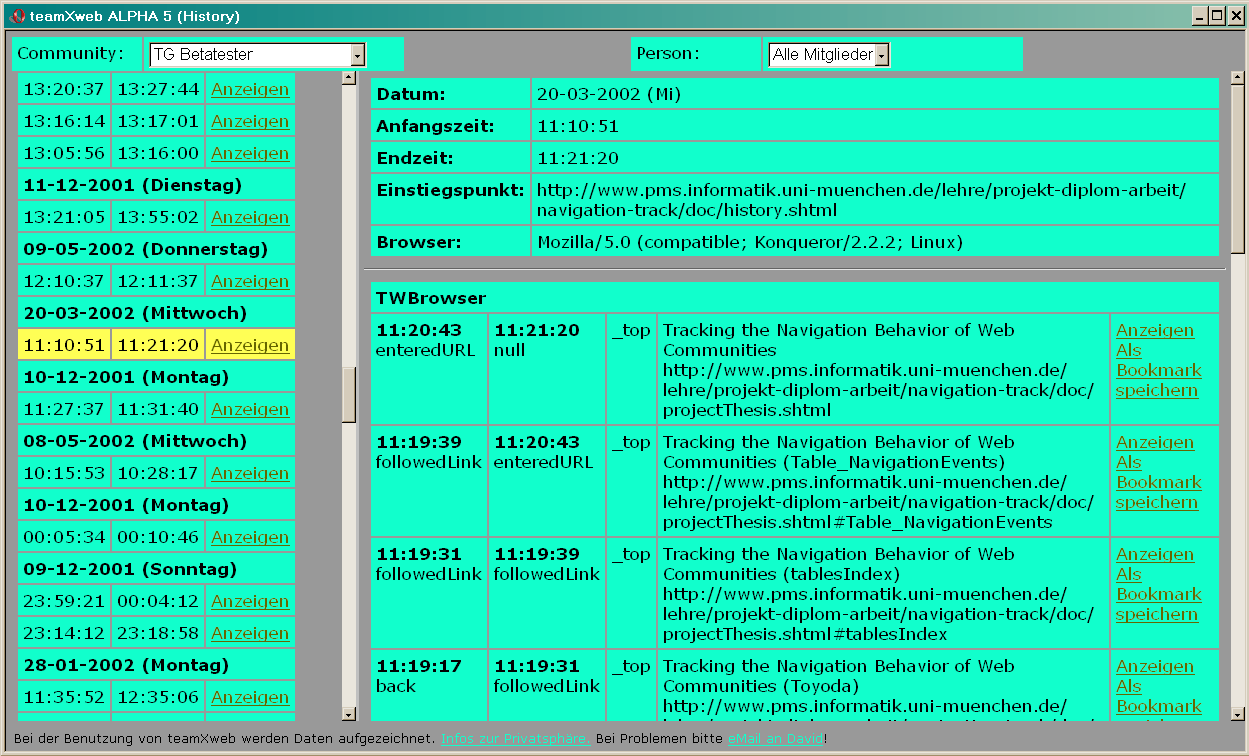 |
Figure 4.2: Screenshot of the teamXweb Session History
Whenever the community-combobox is being changed, the person-combobox is set to the first entry. Whenever the person-combobox is changed (i.e., also when the user has changed the community-combobox), the table with the user sessions is updated to the current selection. The table with the user sessions is displayed in the bottom-left frame. The first entry is the "current session", if available in the current community/person-selection. The following entries are a list of all sessions, in reverse order (last session first), with start-time and end-time and a link that shows the contents of the UserSession in the bottom-right frame. Whenever a user session is selected, both the list of user-sessions and the contents of the currently selected user session are reloaded. The list of user-sessions (an HTML-table) has the currently selected user-session highlighted. The highlighting and accessing of user-sessions works with the indices of the user-sessions. Care must be taken with lists of user-sessions of communities, which are generated by accumulating all the community's user's lists (Community requires a method getUserSessions()).
The selected user session is displayed in the bottom-right frame. On top, the start- and end-time is given, if available. The rest of the page is a reverse-order list of the states in the user session. In the first version, the states are represented simply by the URIs and titles of the pages, plus the time of visit. In a later version, additional information can be made available (e.g., framesets with names, open windows etc.) When a state of a session is selected, that state is restored in the content frame of the window from which the history has been opened.
This section describes the bookmarks in teamXweb and there are two important relations to mention between bookmarks and the session history: first, user sessions are obviously captured passively while the user browses, unlike bookmarks which must explicitely be set by the user. Second, bookmarks are also browsing states. This latter relation is important because it justifies that the Browsing States of the session history need not be editable in any way, as this can be done by adding them as bookmarks and then editing the bookmark.
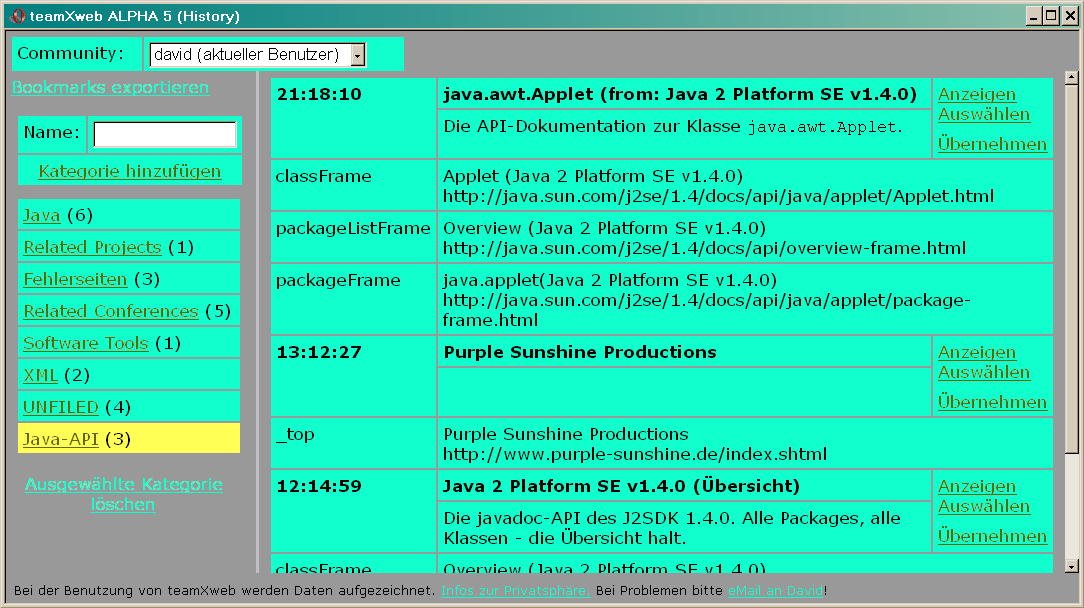 |
Figure 4.3: Screenshot of the teamXweb Bookmarks
This implies that bookmarks can not only be set from the current page, as in most browsers, but also from the session history view. While browsing the session history, users may find certain entries especially interesting and put those entries to the bookmarks. Or he may feel the need to extract a certain Browser State from the session to add additional information - which is only possible with bookmarks.
Which is the major difference between a bookmark and a Browser State: bookmarks are editable. Just like user sessions, bookmarks can have names, descriptions further attributes, like keywords and be put into a hierarchy of categories. Thus, while bookmarks point to the same information in the Web as Browser States, they are more closely related to user sessions in terms of how the user can archive them. Bookmarks are the smallest editable piece of information in the bookmarks section and user sessions are the smallest editable piece of information in the session history.
Finally, as bookmarks are equivalent to browsing states, they can also capture different states of the same frameset. This distinguishes the bookmarks of teamXweb significantly from the bookmarks in most Web browsers, as they usually only store the starting page as bookmark. This feature is particularly useful with documentations like the Java API which rely on a frameset for comfortable navigation.
The user interface for bookmarks is quite similar to the user interface
for the history, as figure 4.3
illustrates. Notice that states of framesets can also be stored as
bookmarks (java.awt.Applet in the Java API in the given
example). While in the history screenshot
(figure 4.2), a community had been
selected (TG Betatester) and the history of all its members
was shown (Alle Mitglieder), in the bookmarks screenshot
the scope was set to the current user: david (aktueller Benutzer).
While sharing bookmarks and history are key components to a system that shall support collaborative Web usage, they need to be complemented by support of the most important aspect of collaboration: communication. One objective of the project is to create a well-integrated platform for collaborative Web usage, and thus the system also provides communication features.
As discussed in chapter 2.4, there are two dimensions of communication in the context of teamXweb: asynchronous vs. synchronous communication, and the target of communication. While synchronous communication (e.g., chat) is a very interesting feature when the system is used heavily and frequently by a large user base, synchronous communication is beyond the scope of the present work. Thus, only asynchronous communication is implemented.
Users can send other users private notes, similar to eMail. The advantage of providing an alternative to eMail is mainly that the whole system is more integrated that way. However, in the long run it makes sense to integrate teamXweb's messaging system with eMail so that users can choose which system to use without a break in the user interface.
Communities are another target of communication, which makes communities a sort of message-board at the same time. The same discussion as before with eMail applies here with the relevant well-established communication services for communities: mailing-lists and newsgroups. However, the tight integration into teamXweb is even more important here than in user to user communication, and the integration of community communication justifies the integration of user to user communication even more.
A long-term goal may be providing a proprietary interface to these services that is well-integrated into teamXweb, but using the open, well-known and well-accepted standards below the surface.
Last but most important, notes can be left on Web sites and pages. This way, pages can be annotated and at the same time, a discussion about the content of the page can be held. When a user leaves a note on a Web site or page, he can choose to whom this note is visible: either it is a private note that only the user can see, or the note is visible to one of the communities he is a member of, or it is a public note that is visible to all users of the system.
A major achievement of teamXweb concerning integration is illustrated by figure 4.4. This is the central overview of everything that has to do with communication. With this overview, the user can find out about messages he has sent or received as well as the communication within communities. Finally, even the annotations made on Web sites or Web pages are available in this view.
While the natural places to find out about these latter forms of communication are the communities respectively Web sites or Web pages where the communication took place, this gives a quick overview. A user no longer has to browse to a specific Web page to find out there are no new messages. Instead, he can see all Web sites and pages with new messages (or: with any messages at all) in a quick overview.
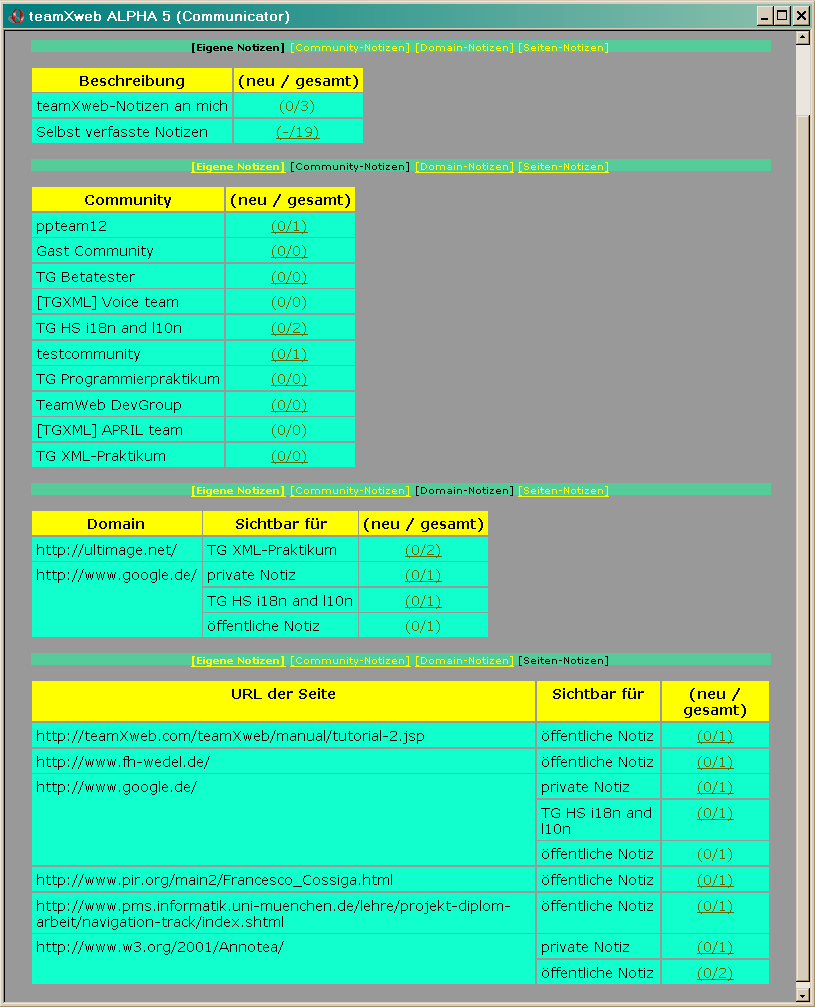 |
Figure 4.4: Screenshot of the teamXweb Communication Overview
The screenshot also illustrates how the scope of communication is handled with annotations on Web pages and Web sites: only those messages the current user is granted access to are displayed, for instance, public notes (öffentliche Notiz), notes for a specific community the user is a member of (TG XML[eXtensible Markup Language]-Praktikum and TG HS i18n and l10n) as well as private notes of that particular user (private Notiz). If there were more communities / Web sites or pages with messages and the overview thus would become cluttered, implementing filtering for specific communications (communities / Web sites / Web pages) or specific scopes (private / public / specific communities) is straightforward. The user interface for selecting these parameters can be almost the same as with session history and bookmarks, as illustrated in figure 4.2 and figure 4.3.
The same choice of scope as for communications - private, per community and public - is also available for the statistical information, which is displayed for each visited page, in the orientation frame below the actual page (see figure 3.3 (2)). There are several types of statistical data which will be outlined in this section.
For each page and site, the number of visits is shown as well as the number of visitors. As mentioned before, this can be referring to the user himself ("how often have I been on this page before?"), one of his communities or all teamXweb users.
The same applies to the followed links: Whenever a user clicks a link on a page, a counter is increased and the most popular links are displayed in the statistics. For many people, however, it may be more interesting to see which links have lead to the page - and this information is also available. Thus, one can easily follow the most popular path towards a page backwards. As pointed out in [Gibson1998b], this can also make finding good hub pages easy.
To illustrate how teamXweb integrates collaboration features compared to other systems, a feature matrix with the most important features has been created. This matrix includes teamXweb (ALPHA 5) compared to major Web browsers (e.g. Netscape, Mozilla, Opera, or Internet Explorer) as well as major Web communities (e.g. Yahoo). The rows of the matrix contain a set of features, and the columns contain if, or how these features are implemented in the given system. Some features are considered not applicable to a given type of system, because the system cannot support these features in principle.
A much more detailed detailed feature-matrix can be found in appendix B. Note however, that this only includes a comparison of teamXweb with major browsers. Web communities are not included in that matrix as much of the data does not apply. Even though teamXweb provides a concept of communities very much like major Web communities, it is more like a Web browser and therefore can be better compared to Web browsers than to Web communities.
| Features | teamXweb | Major Browsers | Major Communities |
|---|---|---|---|
| Browsing | |||
| Bookmarks |
|
|
|
| History |
|
|
|
| Navigation Support / Web Page Statistics |
|
|
|
| Collaboration | |||
| Communities |
|
|
|
| Asynchronous Communication |
|
|
|
| Synchronous Communication1 |
|
|
|
| Annotations |
|
|
|
Table 4.6: Feature-Matrix comparing teamXweb, Major Web Browsers and Web Communities
Footnotes:
1
Not implemented in the current version of teamXweb,
due to time constraints, but a important element of the concept.
In order to test the acceptance and usage of the system, the prototype described in chapter 4 has been implemented and a field experiment with various user groups has been conducted. This section describes the experiment, a follow-up user survey and the results. Firstly, however, the testbed in which the empirical research has been conducted is described.
As the system supports collaborative Web usage, groups in which this sort of collaboration could take place must be motivated to use the system. A few such groups are introduced as candidates for the field test. There were two periods for testing, one in the winter term 2001/2002 and another one in the summer term 2002. The candidate groups for the winter term included the following three courses of the Department of Computer Science at the University of Munich:
Praktikum "XML and E-Commerce"
[http://www.pms.informatik.uni-muenchen.de/lehre/praktikum/xml-ecommerce/01ws02/] is a practical course for
approximately 15 graduate students. The participants are expected to
have solid know-how of Web technologies and Web usage. The tasks involved
are expected to require a lot of information searching on the Web and
this work is suggested to be done in teams of 3 or 4 people.
From this group, the highest acceptance is expected and possibly
valuable feedback on the system can obtained by these "power users". While
in the other courses, the teams all work on the same tasks, the teams
in this project will work on different tasks. However, it is very probable
that the tasks require gathering similar information. Thus, this
community may provide interesting information on how teams with different
aims can loosely cooperate in information gathering.
As the group is relatively small and a good technical know-how is expected from the members, it was chosen as the first group for the experiment. If problems are encountered at this stage, only few people are involved.
Programmierpraktikum (German)
[http://www.pms.informatik.uni-muenchen.de/lehre/praktikum/progprakt/01ws02/progprakt.html] is a practical programming project with
approximately 90 participants that have at least a basic know-how of
programming and are expected to have used the Web previously. The tasks
of the course will be accomplished by teams of 5 members and
involves research on several programming issues and working with the Java APIs.
These Java APIs are accessible via the Web and
are structured in three frames, so this is a typical Use Case for the
features that history and bookmarks work well with framesets.
Information shall be gathered on how teams use the Web for solving their
appointments, both with respect to the resources they use and how they
interact while searching for those resources.
Involving this group is scheduled two weeks after the first group started.
Informatik I (German)
[http://www.dbs.informatik.uni-muenchen.de/Lehre/Info1/] is a lecture for beginners in computer science
with approximately 500 participants. It deals with basic programming
concepts and is focussed on functional programming. As programming
language for examples and exercises, SML is used.
Ideally, a large group can be motivated to voluntarily use the prototype
when working for the lecture.
Many members of that community are expected to start from the
course's homepage which links to resources on the subjects introduced
in the lecture. It shall be quite interesting to find out which
other resources are used by individual students or groups of students.
Possibly, active students annotate the course homepage with links to
additional resources (this should be explicitely motivated).
In this community there may be some people who are relatively new to computing in general and the World-Wide Web in particular. This may help finding out about the acceptance of such a system from inexperienced Web Users. Furthermore, by inviting a large group there is a chance of reducing the problem of a sparse user base which prohibits some of the more interesting features like site-related chats. Another interesting aspect of this community is that the system may help learning groups and other social contacts to emerge.
This group was scheduled to be involved three weeks after the second group started. However, the amount of people participating from the first two groups was not sufficient to make predictions on how the system would work in the case of many people from the last group joining. Therefore, the experiment was not announced to this group. Instead, a heterogenous group of approximately 30 friends of the author was invited to try working with the prototype in no formalized setup. This group will be referenced as others.
As this first phase of the experiment did not provide the expected data due to moderate participation, a second experiment was scheduled for the summer term 2002. In this second phase of the experiment, the following two courses were included:
Hauptseminar "i18n and l10n", World Wide Web
Internationalization and Localization (SS 2002)
[http://www.pms.informatik.uni-muenchen.de/lehre/seminar/internationalisation/02ss/]
is a seminar for approximately 15 graduate students. The participants are expected to
have basic know-how of Web technologies. The tasks involved
are expected to require a lot of information searching on the Web,
but there are no specific groups. However, the whole seminar can be
seen as a community.
Ethnologie@Internet (German)
[http://www.fak12.uni-muenchen.de/vka/frame.htm?/vka/ethnoweb/ethnoweb.htm]
is a seminar for approximately 15 graduate students of ethnology.
The seminar is meant as an introduction to the Internet, and thus
participants are expected to be not too familiar with Internet
technology. The schedule includes group work where participants
are supposed to find out about Web sites about ethnology and rate
them. This task is supposed to be accomplished under supervision
in the University of Munich's main computer pool.
The experiment was meant to provide information about three variables:
For each group, there was a presentation of the system and participants were invited via eMail to use the system. As there was practically no significant participation in the first phase (even after a few reminders via the courses' mailing lists), in the second phase volunteers had to explicitely write their eMail-adresses on a list to indicate they were interested in participating in the experiment. This was done to bind the volunteers more formally to the experiment and assure they can be contacted for clarifications.
From the first group (Praktikum "XML and E-Commerce"), of about 12 people who participated in the course, two logged in to the system. One of them had two sessions, the other had 20 sessions. As expected, this group had the power users providing valuable informal feedback and expressed enthusiasm about the system in personal communications - unfortunately, this applied only to one single person.
Three participants of the second group (Programmierpraktikum) signed on to the system, and they all signed on only once. The group had about 90 participants.
Finally, in the second phase, the more formal mode of participation in the experiment showed some effect: five people signed in from each of the courses. Thus, during the second phase ten more people have used the prototype. However, only one person had four sessions, another had three sessions and the others only one or two.
From the group of others who have been invited personally and did not belong to the formal testbed, one person had 10 sessions and was enthusiastic about the system. One had 5 sessions and at least found the system interesting and usable.
From these results it becomes obvious that no reliable data could be obtained from the experiment. In particular, there was no instance of collaborative usage, which would have been the most interesting kind of usage in the experiment. These results may indicate that the acceptance for a system like this is very low, but other explanations are possible.
To find out more about the acceptance and possible reasons why there were only three people using the system actively, it was then decided to move on to a survey which is discussed in chapter 5.3. However, some interesting anecdotal results from the experiment shall be reported here:
During the sessions at Ethnologie@Internet, there was the opportunity to observe some of the participants while they used teamXweb for the first time. While one person could easily use the system and later provide detailed feedback about useful improvements, two other persons were obviously overcharged with handling the system both conceptually ("what is this good for?") and practically ("how can I use this?"). This may indicate that the system was not intuitive enough for many of the people who tried working with it. Possibly, this is an explanation why even those who signed on to the system, often did not log on more often.
As expected in chapter 3.3, there were some limitations with displaying certain content of the Web. Even though this issue has been pointed out in all the presentations and all written introductions to the systems, some users were very frustrated when trying to work with commercial pages using Macromedia Flash extensively, or search engines using a lot of JavaScript for central navigation features. It may be interesting to conduct further experiments with a system that does not have this limitation.
One hypothesis explaining the low participation in the experiment is that many people did not have enough time to get involved in learning to work with a new and innovative system. All of the participants are students who have to spend extra time learning the system and using it for their academic tasks, and some informally mentioned too little time as reason for not even trying out the prototype in personal communications.
Another potential hindrance for people may be concerns about their privacy. As the system stores Web usage data on a central server, privacy is indeed not particularly secured. Furthermore, the system uses cookies and JavaScript, which have a reputation of posing serious security risks to users that enable them. This has also been mentioned as a reason for not participating in personal communications.
To test these hypothesis and gather further information on how people perceived the system, a questionnaire has been assembled and all the people involved in the two phases of the experiment have been invited to fill out that questionnaire. The questionnaire was implemented as a simple Web form and composed of only ten questions that could be answered in less than 10 minutes. This was done in the assumption that time was a reason for people not to participate and the invitation included a remark that answering the questionnaire would not be a time-consuming task.
This lightweight nature of the user survey proved itself with significant participation. Of exactly 150 people that were asked to participate in the survey, 38 filled out the questionnaire. One questionnaire has been returned blank, which may have been a technical accident and thus is ignored. Overall participation amounts to 25.3% which can be considered pretty good. For the full results of the user survey, see appendix C.3.
Not very surprisingly, most participants are studying computer science (29, which makes 76.3%). Other majors were hardly represented at all, as table 5.3 (1) shows.
| Group | # Replies | Quota |
|---|---|---|
| Computer Science | 29 | 76.32% |
| Ethnology | 2 | 5.26% |
| Anglistics | 1 | 2.63% |
| Computer Linguistics | 1 | 2.63% |
| Science of Politics | 1 | 2.63% |
| Psycho Linguistics | 1 | 2.63% |
Table 5.3 (1): Majors of the Students Participating in the User Survey
The participation relative to the various groups is reproduced in table 5.3 (2). Three people have not answered the question which group they belonged to, which is why there are only 35 people by groups while 38 people answered altogether. Participation is distributed relatively evenly over the different groups, with better participation in Ethnologie@Internet. All values must be seen with precaution as the number of participants in each group is rather small and thus very error prone.
| Group | # Members | # Replies | Quota |
|---|---|---|---|
| Praktikum "XML and E-Commerce" | 12 | 3 | 25% |
| Programmierpraktikum | 90 | 18 | 20% |
| Ethnologie@Internet | 14 | 5 | 36% |
| Hauptseminar "i18n and l10n" | 5 | 1 | 20% |
| Others | 29 | 8 | 28% |
| Overall | 150 | 38 (35) | 25% |
Table 5.3 (2): Participation in the User Survey
15 (39.5% of 38) participants said that they have created an account, only one person (2.6%) has only tried the guest account (however, others may have first used the guest account and later signed on - the statistical data from the experiment indicates that the guest account was used quite frequently, 63 times overall which includes a few logons for testing and demonstration purposes). 13 (34.2%) have not yet tried teamXweb and 8 (21.1%) said they will not try the system. That means that a majority (21 people, 55.3%) has not ever seen the system except possibly during the presentations, which is consistent with the results from the experiment. This also means that only 37 of the 38 participants answered the question on whether they have used teamXweb.
When asked for the reason why they did not or will not try the system, 6 (28.6% of 21, 15.8% of 38) said they did not see a use in the system. Other reasons (multiple selections were allowed) were insufficient time, concerns about security and privacy and general disinterest (3 persons each, 14.3% of 21, 7.9% of 38). Finally, two people said they simply did not want to join an experiment.
The participants could also write an open answer to the question on why they did not try teamXweb. Two mentioned security concerns, however, one of them said the main reason was lack of time. Two participants of the Programmierpraktikum considered the system not useful for their task. A surprising result as use cases particular to that course (Java API, see chapter 5.1) have been introduced in the presentation and these two people answered the question whether they saw the presentation with yes.
The 15 people who did create an account were asked why they did not use the system more often - only one of them had more than 10 sessions, so 14 people were supposed to answer the question. Multiple selections were allowed and two answers indicating that the system was not considered useful (generally and due to the provided contents) were checked by four people each (29% of 14). Two people said they had forgotten their username and password (this was mentioned to the author in previous personal communications and a confirmation eMail was sent to new users with the data since that).
The questionnaire contained a section where people who tried the system
could evaluate various features of the system. For each feature, the
importance and the quality of the implementation could be evaluated
in two separate scales. The scale for the quality had six values from
very good = 1 to insufficient = 6, the scale for the
importance also had six values, ranging from
important = 1 to useless = 6. This scale was
compared to the German grade system which also ranges from 1 to 6, where
1 to 4 indicate that a test or course was passed, while 5 and 6 indicate
failure.
Figure 5.3 (1): User Interface
This question has been answered by 17 people which leads to the conclusion that the one person that has not answered the first question did in fact use teamXweb. The first question was generally about the importance and quality of the user interface. As figure 5.3 (1) shows, the importance was rated very high by most people. One person found the user interface not very important (5 on the scale). The quality of the user interface of teamXweb was considered medium, with a tendency to good. The diagram shows a discrepancy between importance and quality, indicating that the quality of the user interface still needs improvements.
Figure 5.3 (2): No Installation
One of the most important reasons for chosing the architecture discussed in chapter 3.3 was that no installation is required at the clients. As it turned out in the experiment, this must be weighed against the display problems with some pages. So the second part of this question was about the feature of not requiring an installation. The exact wording was "Dass man es [teamXweb] ohne Installation direkt im Web starten kann" (that teamXweb can be started directly in the Web without installation).
As figure 5.3 (2) shows, this has been considered both important and implemented well by most people. Only two people found this feature comparatively unimportant (12% of 17). This must be compared with a later question, where four people indicated that displaying all pages would be a desirable improvement and they would accept installing a plugin for this (11% of 38). From these results, the architectural decision taken in chapter 3 seems to have proven useful, but may still have to be extended.
It does not satisfy the needs of all users, but it seems that more people appreciate needing no installation than people are having trouble with particular pages. The similarity between importance and quality may be an artefact due to the fact that importance and quality are dependent in this case: if the feature is considered important, its existence in a system will probably be considered a "good implementation".
The following parts of this question were concerned with the collaboration features of teamXweb. It must be pointed out that the answers to these questions are of a rather theoretical nature, as participants could hardly use the system in the intended way. This is a consequence of the system not being used by enough related people concurrently to allow collaboration.
Therefore, two features that were not originally intended for the system but "come with the system for free" were also evaluated: bookmarks and history can be accessed by the same user whereever he is. Unlike with common browsers, where these data are stored with the browser installation, teamXweb allows accessing the data anywhere a user has access to the Internet.
The results are compiled in table 5.3 (3). Generally, bookmarks are considered more important than history features (figure 5.3 (3) and figure 5.3 (4) vs. figure 5.3 (5) and figure 5.3 (6)), and accessing history or bookmarks anywhere on the net was considered more important than sharing them (figure 5.3 (4) and figure 5.3 (6) vs. figure 5.3 (3) and figure 5.3 (5)). The finding that Web browser's histories are not considered a very important feature is consistent with the findings of [Catledge] and [Tauscher] that were presented in chapter 1.2.1. There should be a correlation between how often a feature is used (findings of [Catledge] and [Tauscher]) and how important it is considered (findings from this user survey).
A more interesting finding, however, may be that people seem to be more interested in features for themselves than in collaboration features. If the data is representative, this is a possible conclusion from the findings in this survey, and it would be a very good explanation for the results of the experiment. However, this is just a lightly based hypothesis and further research is needed to test this.
Another aspect of teamXweb that may have to be improved, according to the results of the survey, is communication. Most people considered the quality of the implementation medium on the scale, while importance is considered relatively high both by the participants of the survey (see figure 5.3 (7)) and in chapter 2.4 and chapter 4.4. Annotations, on the other hand seem to be accepted consistently in quality and importance as figure 5.3 (8) illustrates.
Figure 5.3 (3): Share Bookmarks | Figure 5.3 (4): Access Bookmarks Anywhere | ||
Figure 5.3 (5): Share History | Figure 5.3 (6): Access History Anywhere | ||
Figure 5.3 (7): Communication within Communities | Figure 5.3 (8): Annotations |
Table 5.3 (3): Evaluation of Collaboration Features
Finally, four questions were asked directly to find out how to motivate people to use the system and what could be improved. For each area, there was a questions where participants had to select from a set of given answers and an open version of the question. The two most important ways of motivating people had to do with other people: 15 people indicated that friends recommending the system to them would be a good motivation, 13 said more people were already using the system would motivate them (39% respectively 34% of 38 participants; multiple selections were allowed, see also table 5.3 (4)). Therefore, if a core set of early adopters can be motivated to use the system, it is very probable that others will follow.
Seven participants said that a private server not accessible by people who do not belong to the relevant community would be a motivation (18% of 38). This indicates that a well-secured peer-to-peer architecture outlined in chapter 3.1.3 may improve usage of the system. Possibly, while it may not be feasible to install this system on a global basis, targetting the system at small installations with a few users may prove successful. In that case, a single, secured server located at the institution where members access the Internet may be sufficient and no peer to peer services required.
| Answer | # Replies | Quota |
|---|---|---|
| Nothing | 1 | 2.6% |
| More, better Features | 6 | 15.8% |
| More People using it already | 13 | 34.2% |
| Friends that use and Recommend it | 15 | 39.5% |
| Getting Money for Using it | 4 | 10.5% |
| Paying Money for Using it | 0 | 0.0% |
| Private Server for my Community | 7 | 18.4% |
Table 5.3 (4): Motivations to Use the System more often
It seems that there is no pressing need to add new features to the system: only six people said this could motivate them to use the system at all or more often (16% of 38), and the question concerning new features had a moderate rate of answers. The maximum was seven people (18%) asking for the possibility to send information into the system via standard eMail. Instead of considering this a new feature, it should be seen as a request for better integration with existing standards, a finding that is consistent with many of the answers to the open questions, for instance:
The theoretical backgrounds for an integrated approach to collaborative Web usage have been established. Both the terminology has been clarified and a variety of existing approaches in various disciplines has been surveyed and their relevance disussed. On that basis, concepts relevant to such an integrated approach have been introduced: collaboration, communities, Web navigation, communication, categorization and privacy and security issues.
An integrated approach to collaborative Web usage can be implemented with many different architectures that were introduced and discussed. In particular, some of these architectures can be combined and the advantages of such combinations have been outlined. As existing architectures did not meet the needs for the system, an approach that was termed meta-browser has been selected and explained in detail.
With the given architecture and time constraints, a set of features for a prototype is possible. This set of features was discussed and finally compared to the feature-set of commonly used Web browsers.
The prototype - called teamXweb - was implemented and tested with an experiment. As the experiment did not provide data with the expected density, it has been complemented with a user survey. The major limitation of the experiment was that no instance of actual collaboration took place, which also limits the reliability of some of the survey's results. Furthermore, more than half of the people who answered the questionnaire did not actually use the system at all.
A system like teamXweb does not only have some inherent complexity but also confronts people with a new approach to using the Web. Aside of the effort to learn using such a new system efficiently, this requires from the potential users a shift in the way they think about the Web and how it is used. While very few early-adopters seem to be capable of performing this shift in thinking, most people will probably start using the system only after some others already use the system and recommend it to them, a typical "chicken-egg" problem
While the core features and concepts of teamXweb have proven themselves a good basis, some improvements to teamXweb facilitating this process include:
Summing it up, there is significant need for further work in the areas of theoretical backgrounds (in particular, modelling Web navigation), implementation as well as gathering empirical data on the acceptance and usability of such an evolving system. It seems that the direction set in the present work is promising, but further steps are needed for realizing the goal of an integrated approach to collaborative Web usage.
In this appendix, a brief overview of the implementation of teamXweb is given. Instead of going through the whole system on all abstraction levels, only aspects that are considered particularly interesting are selected. The appendix starts with a very abstract description of the system from the user's perspective. After that, the technologies used for the implementation are discussed. Then, an overview of the user interface of teamXweb is given. Finally, the processing of Web pages during a user's navigation through the Web is described in some detail, reaching to the level of source-code snippets.
For a discussion of the chosen architecture, see chapter 3.3. As in chapter 3, the UML is used for illustrating the design with diagrams.
As tool for analysis, design and implementing teamXweb, the IDE[Integrated Development Environment]Together Control Center has been used. Together provides modelling with the diagrams defined by the UML and several additional proprietary diagrams. Furthermore, it provides a convenient sourcecode editor. The most important feature, however, is the so-called simultanuous round-trip engineering: whenever changes are applied to class diagrams, the source code is automatically updated - and if the source code is changed, all related class diagrams are updated. That way, it is very easy to switch between design and implementation phases, allowing quick iterations. Finally, an academic license for Together could be obtained for free by [Togethersoft].
For a very abstract view of the system from the user's perspective, see the Use Case diagram in figure A.1 (1). The Use Cases are partitioned into five areas of functionality:
The Use Cases concerning communities and communication are exclusively collaborative, while history includes non-collaborative Use Cases that are extended by collaborative Use Cases. User management is not collaborative in itself but is required for collaborative Use Cases.
Figure A.1 (1): Uses Cases for the teamXweb System
There are two types of actors: users and authentificated users. The only functionality a user has access to is registering with the system or logging in to the system. During registration, the user chooses a unique user name and password that he can later use for logging in. After logging in, a user becomes an authentificated user and can thus all of the functionality available to authentificated users. However, a guest account has been added which allows users acting like authentificated users without having to register or login. There is only one guest account, however, so that all users logging in as guests share the same data.
Use Cases concerning synchronous communication are drawn with white background because they are not implemented in the current system. All other Use Cases are drawn with a green background to indicate that these Use Cases have been implemented successfully.
The process of registering with and logging in to the system is also illustrated with the Activity Diagram in figure A.1 (2). It starts with an HTML-form being shown to the user. If the user is new, he can register by filling out a section for new users within that form, that requires entering a new username and a password that must be entered twice to avoid typing errors that would result in the inability to login at later times. If the username is not unique (i.e., another user already has used that name) or the passwords mismatch, the user is informed with an error message and must try it again. Otherwise, he enters the system.
If the user has previously registered with the system, he is known to the system and should know his username and password that he can enter in another section of the login page. If the login data is correct, he enters the system. Otherwise he is given an error message and must try again. If he fails for three attempts, his session ends. The user interface elements involved in this process are explained in appendix A.3.
Figure A.1 (2): Activities for Registering with or Logging in to the System
This section gives a brief overview of the technologies used for implementing teamXweb. These technologies are only explained insofar it is needed to explain the choice of the given technology. For more detailed information, see the relevant specifications and Web sites.
As implementation language for the server, Java has been chosen. The major reason for this is that Java is not only a programming language, but a development platform with a large set of well-documented and consistent APIs that is used widely in the Web environment. At the time when the implementation was started, the Java™ 2 Standard Edition, Version 1.3.1 (J2SE™)[J2SE13] was the most current stable version of this development platform. Even though first preview releases of Java™ 2 Standard Edition, Version 1.4 (J2SE™)[J2SE14] were already available and used in early versions of the prototype, these had significant incompatibilities with other components that were used (Tomcat in particular) and thus later versions of the prototype have been implemented with the earlier version of Java (1.3.1).
This was not an easy decision because the incompatibilities being fixed was just a question of time and there are significant improvements in J2SE 1.4 that would have simplified development:
These technologies had to be added externally when the older version of the Java Platform replaced the more recent one.
In J2SE 1.3, there is no native support for SSL[Secure Socket Layer]. Therefore, no Web content delivered via a secure HTTP connection (protocol HTTPS) could be viewed with teamXweb. In order to ensure secure content can also be delivered, Java™ Secure Socket Extension (JSSE) is added. See [JSSE] for details on this technology.
XML is used for making various data in teamXweb persistent. XML is very suitable for this task because the data to be persisted is highly structured: users that belong to communities, Web pages that belong to Web sites, bookmarks and history. The only realistic alternative to using XML for this would be using an object oriented database. In fact, an object oriented database would have the advantage that no XML to Java-objects mapping is required. That way, persistence would have been less error prone and the implementation may have been easier. On the other hand, XML is human readable and can be processed in many ways (e.g., via XSL). Furthermore, most object oriented database systems are commercial and therefore could not be used for this project.
For parsing and serializing XML, the Java XML parser [Crimson] was used. It is a small and simple XML parser for Java that is also used as the default parser for JAXP (see also [JAXP]). The XML data was accessed and processed by the application via [JDOM]. While [DOM] is a widely accepted standard for accessing and processing XML data from various programming languages, it is cumbersome to use from Java. [JDOM] is much more oriented on features specific to the Java Platform (e.g., Collections) and therefore integrates much better in a Java application.
In early versions of the prototype, regular expressions
were used to replace the original URIs in hyperlinks of the
documents (for details why this is needed and what exactly is
done, see chapter 3.3 and
appendix A.4). Furthermore,
String replacement is needed to fill data into templates and
replace < and > with
< and >.
As J2SE 1.3 does not
support regular expressions natively, an external API was
needed. Jakarta ORO ([JakartaORO]) was used
because it was simple and easy to learn in replacement of
the regular expression support in
J2SE 1.4.
In later versions of teamXweb, the processing of
Web pages was done with [JTidy].
[JTidy] generates a
DOM[Document Object Model]-tree
for any HTML document, even if it is dirty HTML
not consistent with the standards. While the previous approach
using regular expressions to find instances of
<a href="url"> and replacing the
url-part thereof worked in many cases,
it failed when pages were too dirty. Furthermore,
during the implementation and testing, many additional cases
were discovered that needed processing - and writing regular expressions
for each of these cases would have been cumbersome and
significantly time consuming. Processing the documents
via the DOM abstraction was a much more elegant and safe
approach: instead of going through the document on the
text-level, one can simply look for elements with a certain
name (e.g., <a>) and replace the contents
of specific attributes (e.g., href).
As discussed in chapter 3.3, large parts of the user interface of teamXweb are implemented using HTML with some added JavaScript functionality. The major advantage of this approach is that no client installation is required and it works with any graphical Web browser. While in early versions of teamXweb, even the navigation frame was done with HTML, the functionality accessible via hyperlinks that launched JavaScript methods, a much better look has been achieved by using a Flash movie that was designed by Kernzeit GmbH. The HTML navigation bar is still accessible for compatibility, but the Flash format has been used because it is the de-facto standard for animated vector graphics and available in most browser installations. The buttons in the Flash movie invoke the same JavaScript functions that were previously invoked by hyperlinks. The functionality and a few visual improvements to the navigation Flash movie have been added by the author of the present work. For the communication between the Flash movie running in the Flash plugin and the Web page, LiveConnect is used, which is available in most current browsers. For details on LiveConnect, see [Hoque].
The HTML pages making up the user interface are generated dynamically
with JavaServer Pages™ (JSPs).
An early approach in the
prototype was using servlets (see below) and templates with placeholders
that were dynamically replaced with the data to be shown at
the client. This turned out very cumbersome to say the least.
Java Servlets
are used successfully for the controller part of the user
interface, accepting HTTP requests and converting them
to object oriented method calls to the relevant
helper classes (subclasses of ServletSupport)
as illustrated in figure A.3.3
and figure A.4
(3).
The view, however, consists mostly of template HTML and
JavaScript code in which certain fragments are
dynamically created.
This is exactly what
JSPs were invented for: general (X)HTML pages
can be enhanced with so-called
scriptlets and special
JSP-tags
that are executed on the server to generate the desired
output.
See appendix A.3 for an
overview of how the user interface has been implemented
in teamXweb.
For more detailed information on Java Servlets
and JSPs, see the relevant specifications
[JavaServlet] and [JSP] or the
home page of Java Servlets and JavaServer Pages
at [JavaServletJSPWeb].
Servlets and JSPs require a so-called servlet container that provides the environment the Servlets and JSPs run in. For example, listening on a port for HTTP-requests and converting them to Java objects is done by the servlet container as well as compiling JSPs into Servlets and those Servlets into Java byte code. As servlet container, Apache Tomcat 4.0 ([Tomcat]) has been chosen, as it is a non-commercial implementation of the specifications and is also used in the official Reference Implementation endorsed by the authors of the specifications (Sun Microsystems).
After some users complained that they had forgotten their login data (see chapter 5.3), a functionality has been added to the system that an eMail is automatically sent to the users when they register with the system. Furthermore, users that still know their login name and have added their eMail address to their profile can make the system send them an eMail with their complete login data at any time. For sending these eMails, the JavaMail API ([JavaMail]) has been used as it provides a very easy to user interface to eMail functionality. In future versions of teamXweb, the JavaMail API could also be used to create a bridge between the proprietary communication system within teamXweb and standards based eMail communication.
Finally, both for debugging and logging of normal operation, [Log4J] is used. This provides a convenient and highly configurable system for debug messages as well as system messages. The logging can be directed to different files depending on the origin of the log message, so that for example messages concerning user management are written to another file than messages concerning browsing behavior. While logging functionality is an integral part of the J2SE 1.4, Log4J also works with J2SE 1.3.
This section gives an overview of how the user interface of teamXweb has been implemented. It refers to screenshots in chapter 3.3 and chapter 4. For illustrations, in addition to standard UML diagrams, also so-called Web Application Diagrams are used. These are used because the UML does not provide a good way for giving an overview of a set of JSPs that make up the user interface of a Web application. This type of diagram is provided by Together 5.5, the IDE used for developing teamXweb. While this type of diagram has some limitation as provided by Together (e.g., only one type of relationship between JSPs can be expressed), using it is preferred over creating an own type of diagram because this would have required additional tools which could not be easily integrated into the development process.
The Web Application Diagram uses rectangles with the text
JSP and the name of the JSP below that text for
representing JSPs.
Notes can be added to the diagram in the way notes are added
to common UML diagrams.
There is only one type of relationship between
two JSPs that can be expressed, which is used for
"consists of (either frameset or inclusion)", "replaces" and
"opens (in a new window)".
This relationship is visualized with
a line between two rectangles and even though the relationship is
always directed, this is not visualized in the diagrams
(which is considered a major limitation).
Notice that not all relationships between JSPs are covered in the
diagrams used in this section, to avoid cluttering the diagrams
with lines.
Colors have been used
to make the diagram more expressive. See the notes in
figure A.3.2
(1) for details on how
this is used, and also as an example of a Web Application Diagram.
The user interface of teamXweb has been implemented loosely based on the MVC[Model-View-Controller] design pattern. While the pattern itself is not covered in this section (see [Burbeck] for an introduction), and teamXweb does not implement the pattern consistently, the usage of different technologies for view and controller is characteristic for the usage of this pattern in the Web environment: JSPs are used to implement the view and Servlets are used to implement the controller. The model is implemented separetely with a set of plain Java classes. Furthermore, in the controller part of the MVC pattern, teamXweb uses an own approach to ensure reusability of the application logic.
The model of teamXweb includes classes representing
browser components (e.g., a browser window), Web abstractions
(e.g., Web site, Web page, link) and communication artefacts
(e.g., Note) as well as users and communities. An abstract
overview of the classes modelling the core system of
teamXweb is shown in the Class Diagram in
figure A.3.1
(1).
KnownWeb is a class implementing the Singleton
pattern, that provides access to all Web sites that have
been previously visited with teamXweb. Via those
Web sites, all Web pages can be reached.
Figure A.3.1 (1): Core Model of teamXweb
While the previous example is just the canonical model and
therefore not much explanation is needed, the classes modelling
communication are more technical and therefore, more interesting.
Within teamXweb, there are four classes of objects that
can receive Notes:
User (notes sent to a person)Community (notes sent to a community)WebSite (annotations on Web sites)WebPage (annotations on Web pages)
These classes implement an interface called NoteBoard,
that has one single method, namely getNoteManager().
This is used to get the NoteManager that handles
all functionality concerning notes.
That way, a consistent handling of communication and notes is guaranteed and the related entities receiving notes are encapsulated from the complexity involved with communication. For an overview of the architecture explained, see the Class Diagram in figure A.3.1 (2).
Figure A.3.1 (2): Communication in teamXweb
The view-part of teamXweb basically consists of the following screens:
Most of these screens consist of a set of JSPs that are either
composed within are frameset or via inclusion
(the JSP specification provides an inclusion mechanism with the
element <jsp:include page="name.jsp" />).
Many JSPs are reused for different screens or different states
of the same screen.
Furthermore,
a screen may have different JSPs being displayed one after the
other.
For example, the startup-screen is the entry point of the application. The JSP Startup in figure A.3.2 (1) is basically just the page defining a frameset which consists of CheckBrowser and StatusBar. StatusBar is used in most screens for showing to the user when an action has been completed successfully or when an action has failed. CheckBrowser tests whether the browser used supports sessions (i.e., cookies) and JavaScript. If not, it displays a message to the user explaining how to switch the relevant features on in his browser. If the test is passed, CheckBrowser is automatically replaced with Login.
Login provides a way for the user to select a user interface (with Flash navigation or just plain HTML navigation, see appendix A.2) - and includes the JSPs Authentificate, ResendLoginData, AddUser and GuestLogin. This modular design has been chosen because AddUser, Authentificate and ResendLoginData can be reused when registering or logging in failed. If, for example, a user tried to register (using the section from AddUser that allows entering a new username and password) and either the name was wrong, or the passwords mismatched, Login is replaced with AddUserFailed. This page shows an error message and includes AddUser so that the user can try registering with another username (or type the passwords correctly). This process is also illustrated in figure A.1 (2). When logging in fails (e.g., because the user entered a wrong password for an existing username), AuthentificationFailed is used, which includes Authentificate, ResendLoginData and AddUser (in the given order). With ResendLoginData, the user can enter his username and will be sent an eMail with username and password, as mentioned before in appendix A.2.
If login or registration of a new user was successful, Login, AuthentificationFailed or AddUserFailed (depending on whether login or registration was successful at the first attempt or the first attempt failed) is replaced with Welcome. Welcome then uses JavaScript to open a new window without any browser user interface elements and shows within that window the JSP Window. After this, the login process is finished and the system acts like a common browser with added collaboration features.
Figure A.3.2 (1): The JSPs modelling the GUI of teamXweb (Part 1)
The previous example illustrates how JSPs are used to create the user interface of teamXweb and in particular, how they are used to compose screens either via inclusion or with framesets. Other complex screens are outlined in the following brief overview:
Figure A.3.2 (2): The JSPs modelling the GUI of teamXweb (Part 2)
The controller part of teamXweb has been implemented using Servlets. While in some cases, JSPs directly call other JSPs on user actions, the general pattern is that whenever the user invokes a functionality of the system, a Servlet is called that will process the user's request and send the user a JSP as updated view. The reason why this has not been achieved consistently is limited time. Therefore, the current implementation of teamXweb only partially implements the MVC pattern.
However, in the parts of teamXweb implementing the
controller part of the MVC pattern, an additional layer of abstraction
has been added. Servlets are tied very closely to the Web environment
and HTTP. To encapsulate this technology from the actual application,
each Servlet has a corresponding helper servlet, called
NameSupport.
For an illustration of this pattern, see
figure A.3.3.
NameServlet gets requests encapsulated in
objects from the Servlet container, which in turn gets his requests
from the client via HTTP. NameServlet then
determines how the request must be handled and calls the relevant
method in
NameSupport. For a more
detailed illustration of TrackingServlet and
TrackingSupport, see
figure A.4
(3).
By this encapsulation, much of the functionality of teamXweb could easily be integrated into a custom browser, a plugin or any other architecture that is not in need of communicating via HTTP. The surrounding application would simply call the methods of the helper classes, as it is currently done by the Servlets.
Figure A.3.3: Controller Part of the teamXweb User Interface
The most important functionality required for the meta-browser architecture outlined in chapter 3.3 is replacing all links in the viewed documents with links that load the pages from the system, so that the user stays within the metabrowser. If this fails, the server no longer gets notifications while the user browses the Web, and Web pages can no longer be modified in a way that assures the metabrowser remains intact. Therefore, this functionality has been chosen as an example illustrating how teamXweb was implemented and how some of the technologies are used on a more detailed, technical level, including some source code fragments. This section describes the whole process of loading Web pages with teamXweb, both from the client's and from the server's perspective.
Figure A.4 (1): Loading a Web Page (Client Perspective)
On the client, if the new page to be displayed is part of a frameset, the relevant frame must first be found. This is done with JavaScript, looking for the frame in the document's (HTML-)DOM. After that or if the page is loaded directly into the content frame, the location field that shows the URI of the currently viewed document is updated. Finally, the request is sent to the teamXweb-server. The page the server returns updates the title frame with the document's title and the statistics frame with the statistical data for the currently viewed document (or frameset). As this is done with further requests to the server, it is done more or less parallel. This whole process is illustrated with figure A.4 (1).
The following JavaScript method implements the logic on the client and is included by the server with each document it sends to the client (among other methods). Hyperlinks in the document on the client call this method when the user uses them and they have no specified target(-frame). The method used for framesets (and opening new windows etc.) is much more complex and therefore not useful for this illustration.
/* Loads url to the content frame, with optional additional params.
 * Parameters:
 * key:        the ID of the link (unique within the document)
 * url:        the URI of the document to be retrieved and processed
 * params:     any parameters with the URI ('?par1=val1&par2=val2'-Syntax)
 * userAction: what exactly the user has done (e.g. following link,
 *             using bookmark, using history, opening window)
 */
function loadURIToContentFrame(key, url, params, userAction) {
    // %placeholder% is replaced by the server before the page is sent to the client
    var newLocation = "tracking?%PAR_ACTION%=%ACT_FOLLOW_LINK%"
                          + "&%PAR_USER_ACTION%=" + userAction
                          + "&%PAR_WINDOW%=%window%"
                          + "&%PAR_LINK_KEY%=" + key
                          + "&%PAR_FROM_FRAME%=%fromFrame%"
                          + "&%PAR_TARGET_FRAME%=%fromFrame%"
                          // add ignored value to avoid browser caching
                          + "&ignore=" + Math.round(Math.random()*100000);
    // section is the fragment within a page ('http://[...]/fileName#section')
    var section = extractSection(url);
    if (section) {
        newLocation += "&%PAR_SECTION%=" + section;
    }
    if (params) {
        newLocation += params;
    }
    newLocation += "&%PAR_RESOURCE%=" +url; // must always be last for #section to work


    // update location field
    if (top.TWFrameNavigation.document.FormLocation) {  // HTML navigation-UI
        top.TWFrameNavigation.document.FormLocation.LocationField.value = url;
    }
    if (top.TWFrameNavigation.document.flashNav) {  // Flash navigation-UI
        top.TWFrameNavigation.document.flashNav.Setvariable("url", url);
    }

    // request the page from the server (to the Content-Frame)
    top.TWFrameContent.location.href = newLocation;

    // show the text "Loading Page..." in the title-frame
    top.TWFrameTitle.location.href = "tracking/browserTitle.jsp?title=LoadingPage";
}
When a page has been loaded into the client and is being displayed, the following JavaScript code is executed (this is done by not encapsulating it within a method):
top.TWFrameTitle.location.href = "tracking/browserTitle.jsp?title=%TITLE%";

top.TWFrameStatsScope.document.FormLinksScope.random.value
                                              = Math.round(Math.random()*100000);
top.TWFrameStatsScope.document.FormLinksScope.submit();
The first statement loads a JSP to the title frame that displays
the title of the displayed page. %TITLE% is replaced
by the server with the title of the document before the document
(including this code) is sent to the client.
To understand the following two statements, one must know
that loading the statistical page is triggered from a form
below that statistical page, in which the user can select
the scope for which the statistics shall be applied (only
himself, a community or all users). The first of the
two statements sets the value of a hidden input
field (random) in that form
(FormLinksScope) to a random value to assure
that the browser will not use its cache. Then, it simply
submits the form - and the statistics are reloaded, just
as if the user had selected another scope.
No further parameters are required because the server stores the state, in particular which document the user is currently viewing. This leads to the discussion what happens on the server...
The Activity Diagram in figure A.4 (2) illustrates what happens on the server when a page is retrieved and processed. This will be explained in detail shorty, but first the Java classes implementing this functionality shall be introduced:
The Class Diagram shown in figure A.4 (3) gives an overview of the classes on the server involved in retrieving and processing documents from other Web servers. It also illustrates the pattern encapsulating the functionality from the servlets mentioned in appendix A.3.
Figure A.4 (2): Loading a Web Page (Server Perspective)
The diagram shows three classes:
TrackingServlet: Instantiated by the Servlet
container. Whenever a HTTP request from a client is sent to
the server, either doGet(...) or
doPost(...) are called (depending on the HTTP
request method), with two parameters: the request
encapsulated in an object and an object for sending the result.
Within these methods, TrackingServlet
checks what kind of action is requested and extracts
further parameters from the request object. Then the method
of TrackingSupport required for the given
action is called with the relevant parameters.
TrackingSupport:
Provides the methods relevant for tracking a user browsing
the Web. requestPage(...) and
followLink(...) delegate the work involved
with retrieving and processing a Web page to the
PageProcessor.
PageProcessor: Loads pages from their original
server and applies all relevant processing as described
below. Furthermore, this class provides caching for Web
pages to avoid the significant processing task.
The class provides the actual logic for retrieving and
processing the documents and its function is explained
in detail in the remainder of this section.
Figure A.4 (3): Classes implementing the Proxy and URI-Rewriting Logic
The server must know what kind of navigation
event caused loading of the new page
(%PAR_ACTION% / %PAR_USER_ACTION%).
For this, various methods
exist that are called on the server. This functionality is
implemented with methods of class TrackingServlet
that looks similar to the following
code fragment (which is a "polished" version of the original
doGet(..) method):
public void doGet(HttpServletRequest request, HttpServletResponse response) {
    // get all parameters from the HTTP request encapsulated in the request object
    final String  action        = request.getParameter(PAR_ACTION);
    final String  window        = request.getParameter(PAR_WINDOW);
    final String  fromFrame     = request.getParameter(PAR_FROM_FRAME);
    final String  targetFrame   = request.getParameter(PAR_TARGET_FRAME);
    final String  key           = request.getParameter(PAR_LINK_KEY);
    final String  section       = request.getParameter(PAR_SECTION);
    final String  userAction    = request.getParameter(PAR_USER_ACTION);
    final URI     resource      = new URI(request.getParameter(PAR_RESOURCE));
    final boolean keepURI       = "true".equals(request.getParameter(PAR_KEEP_URI));
    final boolean closeResponse = "true".equals(request.getParameter(PAR_CLOSE_RESPONSE));

    // get the session so that the current user can be obtained
    // (this must be done this way due to the statelessness of the HTTP-protocol)
    final HttpSession session = request.getSession();
    final User user = (User) session.getAttribute(UserManagementServlet.SES_USER);

    // prepare the output
    // set the MIME type of the resulting Web page
    response.setContentType("text/html");
    final PrintWriter toClient = response.getWriter();

    // now forward the request in an object oriented manner to TrackingSupport,
    // hiding all HTTP-specific stuff
    if (action.equals(ACT_OPEN_WINDOW)) {
        support.openWindow(toClient, user, window, resource,
                                   section, keepURI, userAction);
    } else if (action.equals(ACT_CLOSE_WINDOW)) {
        support.closeWindow(toClient, user, window, closeResponse);
    } else if (action.equals(ACT_REQUEST_PAGE)) {
        support.requestPage(toClient, user, window, resource,
                                        section, targetFrame, userAction);
    } else if (action.equals(ACT_FOLLOW_LINK)) {
        support.followLink(toClient, user, window, key, resource,
                                   section, fromFrame, targetFrame, false, userAction);
    } else if (action.equals(ACT_POST_FORM)) {
        support.followLink(toClient, user, window, key, resource,
                                   section, fromFrame, targetFrame, false, userAction);
    }
    toClient.close();
    response.getWriter().close();
}
With the URI that is being requested, the server first checks if that page is cached and if so, and if the version of the document in the cache is still current, it is directly sent to the client.
If no current version of the document is available in the cache,
the page is retrieved from the original server. If there is a problem
retrieving the page from its original server, an error message is
returned to the client. Otherwise, the document can be parsed with
JTidy and further processing can take place in the DOM tree.
This is done in the following method of class PageProcessor
(simplified for illustration purposes: the original method is
more generic):
/**
 * Loads and parses url from the original server.
 * @param url  the location of the document
 * @return the document as DOM
 */
public Document loadPage(URI url) throws IOException {
    final InputStream input = url.openStream();
    final BufferedInputStream in = new BufferedInputStream(input);
    final Tidy tidy = new Tidy();
    final Document page = tidy.parseDOM(in, null);
    return page;
}
All relative URIs must be made absolute. This is because the page has been loaded from the teamXweb server, and any relative URIs would thus point to files on teamXweb that obviously do not exist. As the HTML-DOM tree is used, this is a very straightforward task as the following code fragment illustrates (code has been simplified for illustration purposes: the original method is more generic):
/**
 * Makes content of the href attribute of the a element absolute.
 * @param url  the original URI of doc which is used as base for relative URIs
 * @param doc  the document referred to by url, parsed with JTidy
 */
public void makeURIsAbsolute(URI url, Document doc) {
    final NodeList elements = doc.getElementsByTagName("a");

    Element element = null;
    for (int i = 0; i < elements.getLength(); i++) {
        element = (Element) elements.item(i);
        String attributeValue = getAbsoluteURI(url, "href");
        if (attributeValue != null) {
            element.setAttribute(attributeName, attributeValue);
        }
    }
}
If the page in question defines a frameset, the
contents of the src attributes of frame
elements must be replaced so that they are retrieved from the
teamXweb server. Otherwise the href attributes
of a (anchor) and area (image map) elements
must be replaced with a JavaScript call
that does what has been previously
explained for the client context. This is done in a method that
looks a bit like the following code fragment (simplified
significantly):
/** * Rewrites the URIs in usual links so that they stay within the system. * @param page the (model-)representation of the document on the server * @param doc the DOM-representation ofurl* @param fromFrame the frame in whichurlresides */ public void handleLinkElems(WebPage page, String title, Document doc, String fromFrame) { // do for all "a" elements in the document NodeList anchors = doc.getElementsByTagName("a"); // or "area" for (int i = 0; i < anchors.getLength(); i++) { Element anchor = (Element) anchors.item(i); // get element String href = anchor.getAttribute("href"); // get its href-attribute if (href != null && !href.equals("")) { String target = anchor.getAttribute("target"); // save target // if a target attribute exists, it must be removed - or else, // the new document will be loaded to a frame we cannot control! anchor.removeAttribute("target"); // get a unique key for the link String key = page.addLink(href, findAnchorText(anchor), target); String params = ""; final int paramStart = href.indexOf("?"); if (paramStart > -1) { params = "&" + href.substring(paramStart+1); href = href.substring(0, paramStart); } // now, if it is an http-URI, wrap it into the javascript-statement // mailto, ftp and other protocols are ignored! if (href.startsWith("http")) { // CASE 1: page is loaded to content frame (simple) if ((target == null || BrowserFrame.TOP.equals(target)) && fromFrame.equalsIgnoreCase(BrowserFrame.TOP)) { href = "javascript:loadURIToContentFrame('"+key+"', '" +href+"', '"+params+"', '"+BrowserWindow.FOLLOWED_LINK+"')"; } else { // CASE 2: page is loaded to some frame href = "javascript:loadURIToTarget('"+key+"', '" + (target == null ? fromFrame : target) + "', '" + href + "', '" + params + "', '" + BrowserWindow.FOLLOWED_LINK+"')"; } } // update the document with the new href-value anchor.setAttribute("href", href); } } }
The relevant JavaScript methods are included with the processed document. This is because from a document, only JavaScript methods defined in that document can be accessed. Furthermore, the method calls that will update title and statistics frame at the client are included (see above). Then, the DOM tree is serialized and sent to the client.
Finally, the relevant updates to the server model must be applied. This includes updating the current location of the user on the Web as well as appending the currently viewed page to the history of the current session. This whole process is illustrated in figure A.4 (2).
To illustrate how teamXweb integrates collaboration features compared to other systems, a feature matrix with the most important features has been created. A less detailed overview that also compares teamXweb to major Web communitities has been included in chapter 4.6. In the rows of the matrix a set of features is listed. The columns contain whether a given feature is implemented or not in teamXweb (ALPHA 5) and four Web browsers, namely Mozilla 1.2 (alpha), Opera 6.0, Internet Explorer 6.0 and Amaya 6.4. Netscape 4.x was not included because it is out of date.
| Browsers | ||||||
|---|---|---|---|---|---|---|
| teamXweb | Mozilla | Opera | IE | Amaya | ||
|
F e a t u r e s | 1 Common Browser Functionality | |||||
| 1.1 Browsing | ||||||
| 1.1.1 Enter URI Manually | ![[yes]](checked.gif) | | | | | |
| 1.1.2 Follow Link | | | | | | |
| 1.1.3 Open New Browser Window | | | | | | |
| 1.1.4 Open Link in New Window | ![[no]](unchecked.gif) | | | | | |
| 1.1.5 Save Linked Document to Disk | | | | | | |
| 1.1.6 Display most Web Pages as Intended 1 | | | | | | |
| 1.2 History and Bookmarks | ||||||
| 1.2.1 History | ||||||
| 1.2.1.1 Back Button | | | | | | |
| 1.2.1.1.1 Stack Based | | | | | | |
| 1.2.1.1.2 Recency Based | | | | | | |
| 1.2.1.2 History of Sessions | | | | | | |
| 1.2.1.3 Browse History | | | | | | |
| 1.2.1.3.1 History Grouped by Sessions | | | | | | |
| 1.2.1.3.2 History Grouped by Windows | | | | | | |
| 1.2.1.3.3 History Grouped by Domains | | | | | | |
| 1.2.1.4 Supports Framesets in History | | | | 2 | | |
| 1.2.1.5 Access History Anywhere | | | | | | |
| 1.2.1.6 Share History with Communities | | | | | | |
| 1.2.1.7 History Logging can be Switched Off | | | | | | |
| 1.2.2 Bookmarks | ||||||
| 1.2.2.1 Store Bookmarks | | | | | | |
| 1.2.2.2 Store Bookmarks on Framesets | | | | | | |
| 1.2.2.3 Modify Bookmarks | | | | | | |
| 1.2.2.4 Categorize Bookmarks | 3 | | | | | |
| 1.2.2.5 Notification on Bookmark Change 4 | | | | | | |
| 1.2.2.6 View Bookmarks Overview, with Descriptions | | | | | | |
| 1.2.2.7 Access Bookmarks Anywhere | | | | | | |
| 1.2.2.8 Share Bookmarks with Communities | | | | | | |
Table B (1): Feature-Matrix of Common Browser Functionality
Footnotes:
1
Many Web browsers implement features not documented in the
Web standards (e.g., HTML 4.01 or XHTML 1.0), and many Web
designers use these features. Therefore, when Web pages are
shown on other browsers they may not look as intended. To the
user, it makes no difference whether the document is not
conforming to the standard - he wants to see the document
rendered nicely. As many Web designers test their pages mainly
on the Internet Explorer, that is the browser with the best
"user experience" concerning display Web pages as intended.
Mozilla and Opera do have some problems with some pages but
still display most pages the way they were designed. Amaya
strictly implements the standards and thus fails with many
pages, and teamXweb fails particularly with non-standard
navigation (e.g., Flash, JavaScript or Java).
2
Internet Explorer stores the pages that are retrieved. That way,
the single documents displayed in a frameset can be restored
from the history. However, the whole frameset can not be
restored.
3
Currently only in a flat categorization - future versions will
provide hierarchial categorization.
4
Allows the user setting a date when the document is checked
for changes and if changes have occured, the user is notified.
| Browsers | ||||||
|---|---|---|---|---|---|---|
| teamXweb | Mozilla | Opera | IE | Amaya | ||
|
F e a t u r e s | 2 Collaboration | |||||
| 2.1 Work with Communities (create, modify, join) | | | | | | |
| 2.2 Sending Messages to Other Users | 1 | 2 | 2 | | | |
| 2.3 Sending Messages to Community | | | | | | |
| 2.4 Accessing Messages Anywhere | | | | | | |
| 2.5 Synchronous Communication [Chat] | 3 | 4 | 5 | | | |
| 2.6 Chat with Users on Same Page | 3 | | | | | |
| 2.7 Annotations | ||||||
| 2.7.1 Annotations linked to Document Fragments | | | | | | |
| 2.7.2 Annotations linked to Documents | | | | | | |
| 2.7.3 Annotations linked to Domains | | | | | | |
| 2.7.4 Private Annotations | | | | | | |
| 2.7.5 Community Annotations | | | | | | |
| 2.7.6 Public Annotations | | | | | | |
| 2.8 Integrated Interface | ||||||
| 2.8.1 Same Interface for Annotations and Messages | | | | | | |
| 2.8.2 Integrated Overview over Annotations and Messages | | | | | | |
| 3 Orientation / Statistics | ||||||
| 3.1 View Number of Visits (Self, Community, All) | | | | | | |
| 3.2 View Number of Previous Visitors | | | | | | |
| 3.3 View Number of Current Visitors | | | | | | |
| 3.4 Links | ||||||
| 3.4.1 Overview of Links in the Current Document | | | | | | |
| 3.4.2 See How Often Which Link was Followed | | | | | | |
| 3.4.3 See Links Leading to Document | | 6 | | | | |
| 3.4.4 See How often Links of Document were Used | | | | | | |
| 3.4.5 See How often Links Leading to Document were Used | | | | | | |
| 4 Technical | ||||||
| 4.1 Available Platforms | All 7 | All 8 | Most 9 | Few 10 | Most 11 | |
| 4.2 Requires Installation | | | | | | |
| 4.3 Requires Authentification | 12 | 13 | 13 | 13 | 14 | |
Table B (2): Feature-Matrix for Collaboration, Orientation and Technical Details
Footnotes:
1
Currently, only a proprietary messaging system is included.
Integration of asynchronous communication via the standard protocols
(SMTP, POP3, IMAP4) is planned for a future version.
2
Via the standard protocols SMTP, POP3 and IMAP4 (only Mozilla).
EMail-adresses of other users must be known.
3
Not implemented, yet.
4
With an own client for the standard protocol IRC
(no instant messaging).
5
With an own client for ICQ (instant messenger).
6
However, the number of links pointing to a document can be
displayed.
7 teamXweb only requires a browser that supports
JavaScript. Such browsers are available on all platforms, and
therefore teamXweb is available on all platforms
(at least: platforms with graphical user interfaces).
8
Mozilla builds are available for:
Win32, MacOS 9.x, MacOS X, Linux (x86, sparc64, PowerPC), AIX,
BeOS, BSD/OS (bsdi), FreeBSD, HPUX, NetBSD, OpenVMS, OS/2,
Solaris. As the source code is available, it may be possible
to compile Mozilla for other platforms as well.
9
Opera is implemented for the following operating systems:
Windows, Linux, Mac, OS/2, Solaris, QNX, Symbian.
10
Windows (all 32 bit versions), Mac OS
11
Binary distributions of Amaya are available for:
Linux, Sparc /Solaris, AIX, OSF1, Windows (NT, 95 and 98).
As the source code is available, it may be possible
to compile Mozilla for other platforms as well.
12
The system can be tested with a guest-account that requires
no authentification. However, all guests share the same account
and thus stored information may be lost from one session to
another.
13
No authentification is required for common browser functionality.
For communication features
(e.g., eMail, chat or instant messaging),
authentification is required.
14
No authentification is required for common browser
functionality. However, for annotations that shall be stored
on a public server, a server must be found out and configured
and such a server may require authentification.
This can be a problem as creating an account on that server is
not integrated into Amaya.
The teamXweb prototype has one page that can be used for getting statistical data of the system. These JSP generated statistics are accessible via http://teamXweb.com/teamXweb/statistics/systemStats.jsp. Among other information, there is an overview of all users of the system and how often they have visited teamXweb, an overview of the communities and an overview of all visited Web sites and Web pages. These statistics are optimized for being viewed on the Web and therefore not included in the current work (the short version prints to about 25 pages). Various snapshots of this data at different phases of the experiment are available at http://www.teamXweb.com/doc/statistics/index.shtml.
The questionnaire that has been used for conducting the user survey is available at http://teamXweb.com/teamXweb/statistics/questionnaire2.jsp. It has been written in German language as the participants were German and more people are likely to respond to a questionnaire in their native language. There had been another questionnaire before that wasn't used for the results because all the questions covered in the first questionnaire were also covered in the second questionnaire, and there were only few responses to the first questionnaire.
The questionnaire basically looks like the results given in the next section.
This section contains the raw results of the user survey. As the survey has been conducted with German people, everything is in German. The numbers given are the number of people who answered the questions positively. The percent numbers given in parenthesis next to the numbers are related to the all respondents (i.e., 38). For a summary of the results (in English), see chapter 5.3.
Allgemeine Angaben
Frage 1 von 10: Hast Du teamXweb schon ausprobiert?
Frage 2 von 10 (nur Antworten, falls vorher Antwort 3 oder 4 gegeben wurde):
Frage 3 von 10 (Nur Antworten, falls man nur das Gast-Account getestet hat):
Frage 4 von 10 (nur Antworten, wenn man ein Account auf teamXweb hat):
Frage 5 von 10 (nur Antworten, wenn man teamXweb weniger als 10 Mal benutzt hat):
Frage 6 von 10:
Wie gut haben Dir folgende Teile von teamXweb gefallen bzw. wie
wichtig waren Sie Dir bei der Benutzung?
Frage 7 von 10: Was könnte Dich motivieren, teamXweb öfters bzw. überhaupt zu benutzen (Mehrfachangaben möglich)?
Frage 8 von 10: Weitere Ideen/Wünsche?
Frage 9 von 10: Welche Verbesserungen / neuen Features würdest Du Dir von teamXweb wünschen?
Frage 10 von 10: Weitere Vorschläge, Anmerkungen, Kommentare, Fragen (auch zum Fragebogen):
|
Table C.3 (1): Raw Results of the User Survey
SRF[Simple Report Format] is an XML application that was developed and used to format both the project thesis ([Wagner2002]) and this diploma thesis. It consists of a DTD[Document Type Definition] which is based on XHTML but adds many tags that were missing in XHTML. In particular, tags for a structure of the document are added. Furthermore, an XSL[eXtensible Stylesheet Language] stylesheet has been developed which is used to convert a document formatted with SRF to XHTML that can be displayed in any common Web browser.
The XSL stylesheet implements the following features:
Both the DTD and XSL stylesheet can be downloaded from:
http://www.xml-formats.org/formats/srf/.
It can be used free of charge.
The following list gives an overview of all terms that are used throughout this paper including links to the actual definitions as well as the sections where they have been given:
hub-and-spoke dynamic trees (chapter 1.2.5)The following list gives an overview of all acronyms and abbreviations that are used throughout this paper including links to the first use as well as the chapter where it has occured:
API: Application Program(ming) Interface (chapter 1.2.6)The following table gives an overview of all tables that are included in this paper with a link to the table, its caption and a summary describing the contents of the table:
| Table | Caption / Summary |
|---|---|
| Table 1.1 |
Classification of Web Tools after [Cheung]
This table gives an overview of WebTools as they have been defined by [Cheung] |
| Table 4.2 | Navigation events captured by teamXweb This table gives an overview of the navigation events captured by teamXweb: Window opened, link followed, form filled, URI entered, back, forward, home, history state restored, bookmark state restored, window closed. |
| Table 4.6 |
Feature-Matrix comparing teamXweb, Major Web Browsers and Web Communities
This table compares the features of teamXweb with with those of major Web browsers and communities. |
| Table 5.3 (1) |
Majors of the Students Participating in the User Survey
This table shows the majors of the students participating in the experiment. |
| Table 5.3 (2) |
Participation in the User Survey
This table shows the participation in the user survey, by groups and overall. Participation amounts to 25% both overall and approximately in all of the groups (range from 20% to 36%, mean is 26%). |
| Table 5.3 (3) | Evaluation of Collaboration Features This table compiles the results of the evaluation of features required for collaboration. |
| Table 5.3 (4) |
Motivations to Use the System more often
Results of the question what could motivate the users to use the system more often. |
| Table B (1) |
Feature-Matrix of Common Browser Functionality
This table compares the features concerning common browser functionality of teamXweb with Mozilla, Opera, Internet Explorer and Amaya. |
| Table B (2) |
Feature-Matrix for Collaboration, Orientation and Technical Details
This table compares the features concerning collaboration, orientation and technical details of teamXweb with Mozilla, Opera, Internet Explorer and Amaya. |
| Table C.3 (1) |
Raw Results of the User Survey
This table contains the raw results of the user survey. It is structured exactly like the questionnaire itself, but instead of checkboxes and radiobuttons to select, the results are included. |
The following table gives an overview of all figures that are included in this paper with a link to the figure, its caption and a summary describing what the figure illustrates:
| Figure | Caption / Summary |
|---|---|
| Figure 3.1.1 |
Illustration of Locating the Server at the Web Server
The Web client communicates with the Web server on which also the components for collaborative features reside. When the client communicates with other Web servers, no collaboration features are available. |
| Figure 3.1.2 |
Illustration of Locating the Server at an Intermediary Proxy
The client accesses all Web content via an intermediary proxy. That proxy also provides the components for collaboration. It forwards the requests from the client(s) to the servers and the responses from the servers to the clients. |
| Figure 3.1.3 |
Illustration of a Peer-to-Peer Architecture
All collaboration components exist on all peers, data is shared between each of them. In this diagram, the peers are the Web clients and are implemented in a collaboration that also provides browsing functionality. However, the peer-to-peer architecture could also be used for Web servers or proxies. An optional mediator distributes addresses of the (peer-to-peer) clients. |
| Figure 3.1.4 |
Illustration of the Architecture with an Independent Server
A collaborative client application that directly gets the content from its sources communicates with an independent collaboration server that provides components for collaboration features. |
| Figure 3.3 (1) |
Illustration of the Meta-Browser Architecture
An independent server acts both as a proxy for the actual content and a Web application server for the collaborative features. On the clients, any Web browser can be used to display the collaborative Web application and the actual Web contents. The same browser can also be used to do non-collaborative Web browsing. A page processor forwards the client's requests to the original servers, processes the responses and forwards them back to the clients. |
| Figure 3.3 (2) |
Screenshot of the Meta-Browser within a Browser (Opera)
A Screenshot of the Meta-Browser within the Opera Browser. The frames are marked with red rectangles: navigation frame, content frame and orientation frame. |
| Figure 4.2 |
Screenshot of the teamXweb Session History
A screenshot of the teamXweb history dialog, where the user can select a community, and if available one of the members of the community. The sessions are sorted by time and for each session, there is a detailed description with each action listed. |
| Figure 4.3 |
Screenshot of the teamXweb Bookmarks
A screenshot of the teamXweb bookmarks dialog. Note that the states of framesets can also be stored as bookmarks. |
| Figure 4.4 |
Screenshot of the teamXweb Communication Overview
Screenshot of the teamXweb communication overview that illustrates how a high level of integration is achieved by giving the user an overview of all messages distributed at the various parts of the system. This includes messages the user has received from or sent to other users, messages within communities and annotations on domains and Web pages. |
| Figure 5.3 (1) | User Interface Shows how users evaluated importance and quality of the user interface of teamXweb. While importance was rated very high, the quality was rated medium to good. |
| Figure 5.3 (2) | No Installation Shows how users evaluated importance and quality of having no need for installation of the system. This was considered very important and very well implemented. |
| Figure 5.3 (3) | Share Bookmarks Shows how users evaluated importance and quality of sharing bookmarks among communities. This has been considered important and well implemented. |
| Figure 5.3 (4) | Access Bookmarks Anywhere Shows how users evaluated importance and quality of being able to access their bookmarks anywhere on the Internet. This has been considered very important and well implemented. |
| Figure 5.3 (5) | Share History Shows how users evaluated importance and quality of sharing their session history among communities. This has been considered more or less important and well implemented. |
| Figure 5.3 (6) | Access History Anywhere Shows how users evaluated importance and quality of being able to access their session history anywhere on the Internet. This has been considered moderately well implemented and a little less important. |
| Figure 5.3 (7) | Communication within Communities Shows how users evaluated importance and quality of communication within communities. This has been considered relatively important but only moderately well implemented. |
| Figure 5.3 (8) | Annotations Shows how users evaluated importance and quality of annotating Web resources. This has been considered relatively important and moderately well implemented. |
| Figure A.1 (1) |
Uses Cases for the teamXweb System
This Use Case diagram gives an overview of the Use Cases that teamXweb shall implement. It is divided into the following areas of functionality: User Management, Common Browser Functionality, History, Communities and Communication. There are two different types of actors: user and authentificated user. |
| Figure A.1 (2) |
Activities for Registering with or Logging in to the System
This Activity Diagram shows the process of registering with or logging in to the system from the user's perpective. |
| Figure A.3.1 (1) |
Core Model of teamXweb
An abstract overview of the core model of teamXweb. |
| Figure A.3.1 (2) |
Communication in teamXweb
An overview of the communication system of teamXweb. |
| Figure A.3.2 (1) |
The JSPs modelling the GUI of teamXweb (Part 1)
Web Application diagram with JSPs used for logging in, the meta-browser, account management and communities. |
| Figure A.3.2 (2) |
The JSPs modelling the GUI of teamXweb (Part 2)
Web Application diagram with JSPs used for bookmarks and history, and communication. |
| Figure A.3.3 |
Controller Part of the teamXweb User Interface
This Class Diagram illustrates how Servlets in teamXweb use helper classes to implement their functionality the Servlets in the diagram convert HTTP requests to method calls on the helper classes which are subclasses of ServletSupport. |
| Figure A.4 (1) |
Loading a Web Page (Client Perspective)
This Activity Diagram illustrates how a new Web page is loaded to the client (e.g, after a hyperlink has been followed), from the client's perspective. |
| Figure A.4 (2) |
Loading a Web Page (Server Perspective)
This Activity Diagram illustrates how a new Web page is retrieved and processed on the server, after the client has requested it. |
| Figure A.4 (3) |
Classes implementing the Proxy and URI-Rewriting Logic
This Class Diagram shows the classes directly involved in retrieving and processing Web pages for the meta-browser. It includes the Servlet that gets the request from the client via HTTP. |
| [Amento1999] |
Brian Amento, Will Hill, Loren Terveen, Deborah Hix, Peter Ju:
An empirical Evaluation of User interfaces for Topic Management
of Web Sites.
Proceedings of CHI'99, ACM Press, Pittsburg PA, May 1999, pp. 552-559.
Available at ResearchIndex (Citeseer): http://citeseer.nj.nec.com/amento99empirical.html | Used in: [Chalmers2000], [Chalmers98]. |
| [Armstrong1997] | R. Armstrong, D. Freitag, T. Joachims, and T. Mitchell: WebWatcher: A learning Apprentice for the World Wide Web. In Proc. of the 1995 AAAI Spring Symposium on Information Gathering from Heterogeneous, Distributed Environments, 1995. Available at ResearchIndex (Citeseer): http://citeseer.nj.nec.com/armstrong97webwatcher.html | Used in: [Chalmers2000], [Chalmers98]. |
| [Barret] |
Barret, R., P. Maglio and D. Kellem:
How to Personalize the Web.
In Proc. CHI 97, ACM, 1997, pp. 75-82.
Accessible at: http://www.acm.org/sigchi/chi97/proceedings/paper/rcb-wbi.htm | Used in: [Chalmers98], [Maglio98]. |
| [Bellotti] | Bellotti, V. A. Sellen: Design for Privacy in Ubiquitous Computing Environments. In G. de Michelis, C. Simone and K. Schmidt (Eds.) Proc. Third European Conference on Computer Supported Cooperative Work, (ECSCW '93), pp. 77-92. Kluwer, 1993. | Used in: [Chalmers2000], [Chalmers98]. |
| [Benyon] |
D. Benyon and K. Höök:
Navigation in Information Spaces: supporting the individual.
In Human-Computer Interaction: INTERACT'97, S. Howard, J. Hammond
& G. Lindgaard (editors), pp. 39 - 46, Chapman & Hall, July 1997.
Accessible at: http://www.sics.se/~kia/publications.html |
Used in:
[???].
Used in this paper at: ?. |
| [Borges99a] | Borges, J. and M. Levene: Heuristics for mining high quality user web navigation patterns. Research Note RN/99/68, Department of Computer Science, University College London, Gower Street, London, UK, October 1999. Available at ResearchIndex (Citeseer): http://citeseer.nj.nec.com/borges99heuristics.html | Used in: [???]. |
| [Borges99b] |
Borges, J. and M. Levene:
Data Mining of User Navigation Patterns.
In Proc. of the Web Usage Analysis and User Profiling Workshop,
pp. 31-36, San Diego, California, August 1999.
Available at ResearchIndex (Citeseer): http://citeseer.nj.nec.com/borges00data.html | Used in: [Borges2000b]. |
| [Borges2000a] |
Borges, J. and M. Levene:
A heuristic to capture longer user web navigation patterns.
In Proc. of the first International Conference on Electronic Commerce and
Web Technologies, Greenwich, U.K., September 2000.
Available at ResearchIndex (Citeseer): http://citeseer.nj.nec.com/borges00heuristic.html | Used in: [???]. |
| [Borges2000b] | Borges, J. and M. Levene: A Fine Grained Heuristic to Capture Web Navigation Patterns. In SIGKDD Explorations, Volume 2, Issue 1, 2000, pp. 40-50. Available at ResearchIndex (Citeseer): http://citeseer.nj.nec.com/303916.html | Used in: [???]. |
| [Bush] |
Steve Burbeck:
Applications Programming in Smalltalk-80(TM): How to use Model-View-Controller (MVC).
1987, 1992.
Accessible at: http://st-www.cs.uiuc.edu/users/smarch/st-docs/mvc.html | Used in: [???]. |
| [Bush] |
V. Bush:
As We May Think.
Atlantic Monthly, July 1945. Reprinted in ACM Interactions 3(2),
March 1996, pp. 37-46.
Accessible at: http://www.isg.sfu.ca/~duchier/misc/vbush/ | Used in: [Chalmers2000], [Chalmers98]. |
| [Cabri] |
G. Cabri, L. Leonardi and F. Zambonell:
Supporting Cooperative WWW Browsing: a Proxy-based Approach.
7th Euromicro Workshop on Parallel and Distributed Processing,
Madeira (P), pp. 138-145, Feb. 1999.
Available at ResearchIndex (Citeseer): http://citeseer.nj.nec.com/cabri99supporting.html | Used in: [Borges2000b]. |
| [Cadez] |
Cadez, I., D. Heckerman, C. Meek, P. Smyth, and S. White:
Visualization of navigation patterns on a web site using model based
clustering.
In Proceedings of the sixth ACM SIGKDD International Conference on
Knowledge Discovery and Data Mining, Boston, Massachusetts, August 2000.
Available at ResearchIndex (Citeseer): http://citeseer.nj.nec.com/cadez00visualization.html | Used in: [Borges2000b]. |
| [Catledge] |
Catledge, L.D. and J.E. Pitkow:
Characterizing browsing strategies in the world wide web.
Computer Networks and ISDN Systems, 27(6): 1065-1073, April 1995.
Available at ResearchIndex (Citeseer): http://citeseer.nj.nec.com/catledge95characterizing.html | Used in: [Borges2000b]. |
| [Chakrabarti] |
Chakrabarti, S., B.E. Dom, D. Gibson, J.M. Kleinberg, S.R. Kumar,
P. Raghavan, S. Rajagopalan and A. Tomkins:
Hypersearching the Web.
Scientific American, June 1999.
Accessible at: http://www.sciam.com/1999/0699issue/0699raghavan.html | Used in: [???]. |
| [Chalmers98] |
Chalmers, M., K. Rodden and Dominique Brodbeck:
The Order of Things: Activity-Centered Information Access.
In Proc. 7th Int'l Conf. on the World Wide Web, Brisbane, April 1998,
pp. 359-369.
Accessible at: http://www.dcs.gla.ac.uk/~matthew/papers/preferred.pdf. Available at ResearchIndex (Citeseer): http://citeseer.nj.nec.com/chalmers98order.html | Used in: [Chalmers2000]. |
| [Chalmers2000] |
Chalmers, M.:
When Cookies Aren't Enough: Tracking and Enriching
Web Activity with Recer.
Jan van Eyck Academy Design Symposium: Preferred Placement:
The Hit Economy, Hyperlink Diplomacy and Web Epistemology,
Amsterdam, October 1999.
Published as Preferred Placement: Knowledge Politics on the Web,
Jan van Eyck Academie Editions, 2000, pp. 99-102.
Accessible at: http://www.dcs.gla.ac.uk/~matthew/papers/WWW7/www98.html Available at ResearchIndex (Citeseer): http://citeseer.nj.nec.com/284189.html |
Used in: [???].
Used in this paper at: 1. |
| [Cheung] |
Cheung, D.W., B. Kao and J. Lee:
Discovering User Access Patterns on the World-Wide Web.
In Proceedings of the 1st Pacific-Asia Conference on Knowledge
Discovery and Data Mining (PAKDD'97), February 1997.
Available at ResearchIndex (Citeseer): http://citeseer.nj.nec.com/cheung97discovering.html | Used in: [Masseglia]. |
| [Claypool] | Claypool, Mark, Anuja Gokhale, Tim Miranda, Pavel Murnikov, Dmitry Netes and Matthew Sartin: Combining Content-Based and Collaborative Filters in an Online Newspaper. In Proceedings of ACM SIGIR Workshop on Recommender Systems, August 1999. Available at ResearchIndex (Citeseer): http://citeseer.nj.nec.com/claypool99combining.html |
Used in: [???].
Used in this paper at: 1. |
| [Cockburn99a] |
Andy Cockburn, Saul Greenberg, Bruce McKenzie, Michael Jasonsmith
aund Shaun Kaasten:
WebView: A Graphical Aid for Revisiting Web Pages.
In Proceedings of the OZCHI'99 Australian Conference on Human
Computer Interaction, Wagga Wagga Australia, November 1999.
Available at ResearchIndex (Citeseer): http://citeseer.nj.nec.com/cockburn99webview.html |
Used in:
[???].
Used in this paper at: ?. |
| [Cockburn99b] |
Andy Cockburn and Saul Greenberg
Issues of Page Representation and Organisation in Web Browser's
Revisitation Tools.
In Proceedings of the OZCHI'99 Australian Conference on Human
Computer Interaction, Wagga Wagga Australia, November 1999.
Accessible via: http://www.cpsc.ucalgary.ca/grouplab/papers/index.html |
Used in:
[???].
Used in this paper at: ?. |
| [Conklin1995] | J. Conklin: A survey of hypertext. Technical Report MCC Technical Report Number STP356-86, Rev. 2, Software Technology Program, December 3, 1987. Available at ResearchIndex (Citeseer): http://citeseer.nj.nec.com/conklin95survey.html |
Used in:
[?],
Used in this paper at: 1. |
| [Cooley97] | Cooley, R., B. Mobasher and J. Srivastava: Web mining: Information and pattern discovery on the world wide web. In ICTAI'97, Dec. 1997. Available at ResearchIndex (Citeseer): http://citeseer.nj.nec.com/cooley97web.html |
Used in:
[Spiliopoulou99a],
[Masseglia].
Used in this paper at: 1. |
| [Cove] | J.F. Cove and B.C. Walsh: Online text retrieval via browsing. In Information Processing and Management, Vol 24, No. 1, 1988. pp. 31-37. | Used in: [Catledge], |
| [Crimson] | Apache Crimson. Project Web page: http://xml.apache.org/crimson/ | Used in: [???]. |
| [Davison2000] | Brian D. Davison: Topical locality in the Web: Experiments and observations. Technical Report DCS-TR-414, Department of Computer Science, Rutgers University, 2000. Available at ResearchIndex (Citeseer): http://citeseer.nj.nec.com/davison00topical.html | Used in: [???]. |
| [Deakin] |
Neil Deakin:
XUL Tutorial.
XULPlanet.com, 2002.
Available at: http://www.xulplanet.com/tutorials/xultu/ | Used in: [???]. |
| [Dean] |
Jeffrey Dean and Monika Henzinger.
Finding related pages in the World Wide Web.
In Proceedings of the 8th International World Wide Web Conference,
Toronto, Canada, May 1999.
Available at ResearchIndex (Citeseer): http://citeseer.nj.nec.com/dean99finding.html | Used in: [???]. |
| [Dieberger] | Dieberger, A.: Supporting Social Navigation on the World Wide Web. International Journal of Human-Computer Studies, Vol. 46, No. 6, June 1997, pp. 805-825. Available at ResearchIndex (Citeseer): http://citeseer.nj.nec.com/andreas97supporting.html | Used in: [???]. |
| [Dieberger1998] |
Dieberger, A. and Frank, U:
A City Metaphor to Support Navigation in Complex Information
Spaces.
Journal of Visual Languages and Computing,
Vol. 9, No. 6, 1998, pp. 597-622.
Available at ResearchIndex (Citeseer): http://citeseer.nj.nec.com/261020.html | Used in: [???]. |
| [Dieberger1999] |
Andrease Dieberger, Kristina Höök:
Applying principles of social navigation to the design of
shared virtual spaces.
DRAFT VERSION from the WWW (no longer available at the given URL!)
(Previously) Available at: http://www.mindspring.com/~juggle5/Writings/Publications/WebNet99.html | Used in: [???]. |
| [Dieberger2000] |
Andreas Dieberger, Peter Lönnqvist:
Visualizing interaction history on a collaborative web server.
In Hypertext 2000 (San Anotnio, TX, 2000), ACM Press.
Available at ResearchIndex (Citeseer): http://citeseer.nj.nec.com/dieberger00visualizing.html | Used in: [???]. |
| [DOM] | W3C Document Object Model (DOM). Project Web page: http://www.w3.org/DOM/ | Used in: [???]. |
| [Efe] |
Kemal Efe, Vijay Raghavan, C. Henry Chu, Adrienne L. Broadwater,
Levent Bolelli and Seyda Ertekin:
The Shape of the Web and Its Implications for Searching the Web.
2000.
Available at ResearchIndex (Citeseer): http://citeseer.nj.nec.com/efe00shape.html | Used in: [???]. |
| [Flash] | Macromedia - Flash MX. Product Web page: http://www.macromedia.com/software/flash/ | Used in: [???]. |
| [Flake] |
Gary Flake, Steve Lawrence, and C. Lee Giles:
Efficient identification of web communities.
In Sixth ACM SIGKDD International Conference on Knowledge Discovery
and Data Mining, pages 150--160, Boston, MA, August 20--23 2000.
Available at ResearchIndex (Citeseer): http://citeseer.nj.nec.com/flake00efficient.html | Used in: [???]. |
| [Gibson] |
David Gibson, Jon Kleinberg, and Prabhakar Raghavan:
Inferring web communities from link topology.
In Proceedings of the Ninth ACM Conference on Hypertext and
Hypermedia, pages 225--234, June 1998.
Available at ResearchIndex (Citeseer): http://citeseer.nj.nec.com/kleinberg98inferring.html | Used in: [???]. |
| [Gibson1998b] | D. Gibson, J. Kleinberg, P. Raghavan P.: Structural Analysis of the World Wide Web. WWW Consortium Web Characterization Workshop, November 1998. Available at: http://www.w3.org/1998/ 11/05/wc-workshop/papers/kleinber1.html | Used in: [???]. |
| [GTRC1998] | Georgia Tech Research Corporation: GVU's Tenth WWW User Survey. Conducted October 1998. Available at: http://www.gvu.gatech.edu/user_surveys/, in particular: Web and Internet Use / Problems Using the Web. |
Used in: [???].
Used in this paper at: 1. |
| [Goecks] |
Goecks, J., and Shavlik, J.:
Automatically labeling web pages based on normal user interactions.
In Proceedings of the IJCAI Workshop on Machine Learning for Information
Filtering, Stockholm, Sweden, July 1999.
Available at ResearchIndex (Citeseer): http://citeseer.nj.nec.com/goecks99automatically.html | Used in: [???]. |
| [Greenberg96] |
Greenberg, S. and M. Roseman:
GroupWeb: A groupware web browser.
In Proceedings of the ACM Conference on Computer Supported Work (CSCW'96),
Video Program, page 7, New York, Nov.16--20 1996. ACM Press.
Available at ResearchIndex (Citeseer): http://citeseer.nj.nec.com/greenberg96groupweb.html | Used in: [???]. |
| [Greenberg] |
Greenberg, S.:
Collaborative Interfaces for the Web.
In C. Forsythe, E. Grose and J. Ratner (editors), Human Factors and
Web Development, Chapter 18, p241-254, LEA Press, 1997.
Available at ResearchIndex (Citeseer): http://citeseer.nj.nec.com/245748.html | Used in: [???]. |
| [Hascoet1999] |
Mountaz Hascoët:
Navigation and interaction within graphical bookmarks.
Rapport interne du LRI, N°1232, 1999.
(Internal Report of the LRI, No. 1232, 1999.)
Available at ResearchIndex (Citeseer): http://citeseer.nj.nec.com/296052.html | Used in: [???]. |
| [Hascoet] |
Mountaz Hascoët:
Integration of navigational aids in the user interface.
Hypertext'00, San Antonio, June 2000.
Available at ResearchIndex (Citeseer): http://citeseer.nj.nec.com/323639.html | Used in: [???]. |
| [Herlocker] |
Jonathan L. Herlocker, Joseph A. Konstan, and John Riedl:
Explaining collaborative filtering recommendations.
In Computer Supported Cooperative Work, 2000. pp. 241-250.
Available at ResearchIndex (Citeseer): http://citeseer.nj.nec.com/421045.html | Used in: [???]. |
| [Hoque] |
Reaz Hoque:
Java, JavaScript and plug-in interaction using client-side
LiveConnect.
Netscape TechNote, 1999.
Available at: http://developer.netscape.com/docs/technote/javascript/liveconnect/liveconnect_rh.html | Used in: [???]. |
| [J2SE13] | Java™ 2 Platform, Standard Edition, Version 1.3 (J2SE™). Product Web page: http://java.sun.com/j2se/1.3/ | Used in: [???]. |
| [J2SE14] | Java™ 2 Platform, Standard Edition, Version 1.4 (J2SE™). Product Web page: http://java.sun.com/j2se/1.4/ | Used in: [???]. |
| [JakartaORO] | Jakarta ORO. Project Web page: http://jakarta.apache.org/oro/ | Used in: [???]. |
| [JAXP] | Java™ API for XML Processing (JAXP). Product Web page: http://java.sun.com/xml/jaxp/ | Used in: [???]. |
| [JavaMail] | JavaMail™ API. Product Web page: http://java.sun.com/products/javamail/ | Used in: [???]. |
| [JavaServlet] | Danny Coward: Java™ Servlet Specification Version 2.3 Sun Microsystems, 2001. Available from: http://www.jcp.org/aboutJava/communityprocess/final/jsr053/ | Used in: [???]. |
| [JavaServletJSPWeb] | Java™ Servlet Technology. Product Web page: http://java.sun.com/products/servlet/ | Used in: [???]. |
| [JDOM] | JDOM. Project Web page: http://www.jdom.org/ | Used in: [???]. |
| [JSP] |
Eduardo Pelegrí-Llopart (edt.):
JavaServer Pages™ Specification, Version 1.2.
Sun Microsystems, 2001.
Available from: http://www.jcp.org/aboutJava/communityprocess/final/jsr053/ | Used in: [???]. |
| [JSSE] | Java™ Secure Socket Extension. Product Web page: http://java.sun.com/products/jsse/ | Used in: [???]. |
| [JTidy] | JTidy - HTML Parser and pretty-printer in Java. Project Web page: http://lempinen.net/sami/jtidy/ | Used in: [???]. |
| [Kaasten] |
Shaun Kaasten and Saul Greenberg:
Integrating Back, History and Bookmarks in Web Browsers.
In Extended Abstracts of the ACM Conference of Human Factors in
Computing Systems (CHI'01), ACM Press, 2000.
Accessible at: http://www.cpsc.ucalgary.ca/grouplab/papers/index.html | Used in: [???]. |
| [Kahan] |
Jose Kahan and Marja-Ritta Koivunen:
Annotea: an open {RDF} infrastructure for shared Web annotations.
In World Wide Web, 2001. pp. 623-632.
Accessible at: http://citeseer.nj.nec.com/kahan01annotea.html | Used in: [???]. |
| [Kleinberg] | Jon Kleinberg: Authoritative sources in a hyperlinked environment. In Proceedings of the 9th ACM-SIAM Symposium on Discrete Algorithms, 1998. Available at ResearchIndex (Citeseer): http://citeseer.nj.nec.com/87928.html | Used in: [???]. |
| [Kleinberg99] | Jon M. Kleinberg, Ravi Kumar, Prabhakar Raghavan, Sridhar Rajagopalan, and Andrew S. Tomkins: The web as a graph: measurements, models and methods. In Proceedings of the International Conference on Combinatorics and Computing, 1999. Available at ResearchIndex (Citeseer): http://citeseer.nj.nec.com/kleinberg99web.html | Used in: [???]. |
| [Koch] | Andreas Geyer-Schulz, Stefan Koch and Georg Schneider: Virtual Notes: Annotations on the WWW for Learning Environments. Proceedings of the Fifth Americas Conference on Information Systems (AMCIS 1999), pp. 136-138, Milwaukee, WI, 1999. Available at ResearchIndex (Citeseer): http://citeseer.nj.nec.com/263780.html | Used in: [???]. |
| [Kraus] | Michael Kraus: Browsing Context-Dependent Presentation of Web Pages. Available at: http://www.pms.informatik.uni-muenchen.de/lehre/oberseminar/markup/01ws02/browsingcontext/browsingcontext.html | Used in: [???]. |
| [Kumar] |
Ravi Kumar, Prabhakar Raghavan, Sridhar Rajagopalan, Andrew Tomkins:
Trawling the web for emerging cybercommunities.
Proc. 8th International World Wide Web Conference, WWW8, 1999.
Available at ResearchIndex (Citeseer): http://citeseer.nj.nec.com/ravi99trawling.html | Used in: [???]. |
| [Larson] |
R. Larson:
Bibliometrics of the World Wide Web: An exploratory analysis
of the intellectual structure of cyberspace.
Ann. Meeting of the American Soc. Info. Sci., 1996.
Accessible at http://sherlock.berkeley.edu/asis96/asis96.html | Used in: [Gibson]. |
| [Laurent] |
Laurent, D. and L. Vignollet.
An annotation tool for web browsers and its applications to
information retrieval.
In Proceedings of RIAO2000, Paris, April 2000.
Accessible at http://www.univsavoie.fr/labos/syscom/Laurent.Denoue/riao2000.doc. Available at ResearchIndex (Citeseer): http://citeseer.nj.nec.com/denoue00annotation.html | Used in: [???]. |
| [Li] |
Li, W-S., Q. Vu, E. Chang, D. Agrawal, Y. Hara, and H. Takano:
PowerBookmarks: A System for Personalizable Web Information
Organization, Sharing, and Management.
In Proceedings of the Eighth International World-Wide Web Conference,
May 1999.
Available at ResearchIndex (Citeseer): http://citeseer.nj.nec.com/260729.html | Used in: [???]. |
| [Lieberman] |
Lieberman, H.:
Letizia: An Agent that Assists Web Browsing.
In Proceedings of the International Joint Conference on
Articifial Intelligence (IJCAI'95), 1995.
Available at ResearchIndex (Citeseer): http://citeseer.nj.nec.com/lieberman95letizia.html | Used in: [Masseglia]. |
| [Lifantsev2000] |
Maxim Lifantsev:
Open Peer-Review as Web's Self-Organization Force.
Technical Report TR-78, ECSL, Department of Computer Science,
SUNY at Stony Brook, Stony Brook, NY, February 2000.
Available at ResearchIndex (Citeseer): http://citeseer.nj.nec.com/353131.html | Used in: [???]. |
| [Loennqvist] |
Peter Lönnqvist, Andreas Dieberger, Kristina Höök, Nils Dahlbäck:
Usability Studies of a Socially Enhanced Web Server.
Available at ResearchIndex (Citeseer): http://citeseer.nj.nec.com/412343.html | Used in: [???]. |
| [Log4J] | Jakarta Log4J. Project Web page: http://jakarta.apache.org/log4j/docs/ | Used in: [???]. |
| [LOGML] |
John Punin, Mukkai Krishnamoorthy and Gerard Uffelman (editors):
LOGML (Log Markup Language). Accessible at: http://www.cs.rpi.edu/~puninj/LOGML/draft-logml.html |
Used in: [???].
Used in this paper at: 1. |
| [NetObjects] |
NetObjects Press Release September 29, 1997:
NetObjects Does It Again.
NetObjects TeamFusion Solves #1 Problem Facing Web Teams With
First Roles-Based Team Site Building Product.
http://www.netobjects.com/company/html/pra29sep97.html |
Used in:
[???].
Used in this paper at: ?. |
| [Maglio] |
P.P. Maglio and R. Barrett:
On the Trail of Information Searchers.
In Proceedings of the Nineteenth Annual Conference of the Cognitive
Science Society. Mahwah, NJ: Lawrence Erlbaum, 1997.
Available at ResearchIndex (Citeseer): http://citeseer.nj.nec.com/134365.html |
Used in:
[???].
Used in this paper at: ?. |
| [Maglio1997b] |
P.P. Maglio and R. Barrett:
How to build modeling agents to support web searchers.
In User Modeling: Proceedings of the Sixth User Modeling
International Conference, pp. 5--16, December 1997.
Available at ResearchIndex (Citeseer): http://citeseer.nj.nec.com/maglio96how.html |
Used in:
[???].
Used in this paper at: ?. |
| [Maglio98] |
P.P. Maglio and T. Matlock:
Metaphors We Surf the Web By.
To appear in Workshop on Personalized and Social Navigation in
Information Space, Stockholm, Sweden, 1998.
Available at ResearchIndex (Citeseer): http://citeseer.nj.nec.com/187494.html |
Used in:
[???].
Used in this paper at: ?. |
| [Marais] |
Hannes Marais and Krishna Bharat:
Supporting cooperative and personal surfing with a desktop
assistant.
In Proceedings of ACM UIST'97, 129--138, ACM, 1997.
Available at ResearchIndex (Citeseer): http://citeseer.nj.nec.com/marais97supporting.html | Used in: [???]. |
| [Masseglia] |
Masseglia, F., P. Poncelet and R. Cicchetti:
An Efficient Algorithm for Web Usage Mining. 1999.
Available at ResearchIndex (Citeseer): http://citeseer.nj.nec.com/399609.html | Used in: [???]. |
| [Maxwell] |
Maxwell, J. C.:
Beyond Cooperation. 2002.
Available at: http://www.byroncenterchurch.org/john_maxwell/beyond_cooperation.htm | Used in: [???]. |
| [McKinley] |
P. K. McKinley, A. M. Malenfant, and J. M. Arango:
Pavilion: A Middleware Framework for Collaborative Web-Based Applications.
In Proceedings of the International ACM SIGGROUP Conference on
Supporting Group Work, pp. 179-188, Phoenix, Arizona, November 1999.
Available at ResearchIndex (Citeseer): http://citeseer.nj.nec.com/277477.html | Used in: [???]. |
| [Pazzani] |
Pazzani, M. and D. Billsus:
Learning Collaborative Information Filters.
In Machine Learning: Proceedings of the 15th International
Conference, 1998.
Available at ResearchIndex (Citeseer): http://citeseer.nj.nec.com/billsus98learning.html | Used in: [Claypool], [Rafter]. |
| [Pazzani99] |
Pazzani, M.:
A Framework for Collaborative, Content-Based and Demographic
Filtering.
Artificial Intelligence Review, 1999.
Available at ResearchIndex (Citeseer): http://citeseer.nj.nec.com/pazzani99framework.html | Used in: [Claypool], [Rafter]. |
| [Plaisant1999] | Catherine Plaisant, Anne Rose, Gary Rubloff, Richard Salter, Ben Shneiderman: The design of history mechanisms and their use in collaborative educational simulations. Proceedings of the Computer Support for Collaborative Learning (CSCL) 1999 Conference., Palo Alto, CA: Stanford University, 348-359. Available at ResearchIndex (Citeseer): http://citeseer.nj.nec.com/plaisant99design.html |
Used in:
[???].
Used in this paper at: ?. |
| [Rafter] |
Rafter R., K. Bradley, B. Smyth:
Passive Profiling and Collaborative Recommendation.
In: Proceedings of the 10th Irish Conference on Artificial Intelligence
and Cognitive Science, Cork, Ireland, September 1999.
Available at ResearchIndex (Citeseer): http://citeseer.nj.nec.com/rafter99passive.html | Used in: [???]. |
| [Ransom] |
Stephen Ransom, Xingdong Wu, Heinz Schmidt:
Disorientation and Cognitive Overhead in Hypertext Systems.
Available at ResearchIndex (Citeseer): http://citeseer.nj.nec.com/96684.html |
Used in:
[???].
Used in this paper at: ?. |
| [Resnick1994] |
Paul Resnick, Neophytos Iacovou, Mitesh Suchak, Peter Bergstrom,
John Riedl:
Grouplens: An open architecture for collaborative filtering of netnews.
In Proceedings of ACM 1994 Conference on Computer Supported
Cooperative Work, pages 175--186. Chapel Hill, NC, 1994.
Available at ResearchIndex (Citeseer): http://citeseer.nj.nec.com/resnick94grouplens.html | Used in: [???]. |
| [Pirolli] |
Pirolli, P., J. Pitkow and R. Rao:
Silk from a Sow's Ear: Extracting Usable Structures from the Web.
Proc. CHI 96, ACM 1996, pp. 118-125.
Available at ResearchIndex (Citeseer): http://citeseer.nj.nec.com/pirolli96silk.html | Used in: [Chalmers98], [Spiliopoulou99a]. |
| [Pitkow] |
Pitkow, J.:
In Search of Reliable Usage Data on the WWW.
In Proceedings of the 6th International World Wide Web Conference,
Santa Clara, CA 1997, pp. 451-462.
Available at ResearchIndex (Citeseer): http://citeseer.nj.nec.com/242362.html | Used in: [Masseglia]. |
| [Shum1990] |
Shum, S.B.:
Real and Virtual Spaces: Mapping from spatial cognition to Hypertext.
In Hypermedia, Vol.2, No.2, 1990, pp. 133-158.
Available at ResearchIndex (Citeseer): http://citeseer.nj.nec.com/shum90real.html | Used in: [?]. |
| [Spiliopoulou99a] |
Spiliopoulou, M. and L. C. Faulstich:
WUM: A Web Utilization Miner.
In Proceedings of EDBT Workshop WebDB98, Valencia, Spain, LNCS 1590,
Springer Verlag, 1999.
Available at ResearchIndex (Citeseer): http://citeseer.nj.nec.com/spiliopoulou98wum.html | Used in: [Masseglia]. |
| [Spiliopoulou99b] | Spiliopoulou, M.: The laborious way from data mining to web log mining. Computer Systems Science & Engineering, Vol. 14, No. 2. March 1999. Available at ResearchIndex (Citeseer): http://citeseer.nj.nec.com/158449.html | Used in: [Spiliopoulou99a]. |
| [Srivastava] |
Srivastava, J., R. Cooley, M. Deshpande and P.-N. Tan:
Web usage mining: Discovery and applications of usage patterns
from web data.
SIGKDD Explorations, 1(2):12-23, 2000.
Available at ResearchIndex (Citeseer): http://citeseer.nj.nec.com/srivastava00web.html |
Used in:
[Borges2000b].
Used in this paper at: 1. |
| [Tauscher] |
Linda Tauscher and Saul Greenberg:
How people revisit web pages: empirical findings and
implications for the design of history systems.
In Int. J. Human-Computer Studies 47, pp. 97-137, 1997.
Accessible at http://ijhcs.open.ac.uk/tauscher/tauscher-pdf.html | Used in: [???]. |
| [Terveen] |
Loren Terveen and Will Hill:
Beyond Recommender Systems: Helping People Help Each Other.
In HCI In The New Millenium, Jack Carroll, ed., Addison-Wesley, 2001.
Available at ResearchIndex (Citeseer): http://citeseer.nj.nec.com/terveen01beyond.html | Used in: [???]. |
| [Terzis] |
Sotirios Terzis and Paddy Nixon:
Building the next generation groupware: A survey of groupware
and its impact on the virtual enterprise.
Department of Computer Science, Trinity College Dublin, Ireland 1999.
Available at ResearchIndex (Citeseer): http://citeseer.nj.nec.com/terzis99building.html | Used in: [???]. |
| [Togethersoft] | Togethersoft. Company Web page: http://www.togethersoft.com | Used in: [???]. |
| [Tomcat] | The Jakarta Site - Apache Tomcat. Project Web page: http://jakarta.apache.org/tomcat/ | Used in: [???]. |
| [Toyoda] | Toyoda, M. and M. Kitsuregawa: A Web Community Chart for Navigating Related Communities. Tenth International World Wide Web Conference, 2001. http://www10.org/cdrom/posters/p1083/index.htm | Used in: [???]. |
| [Twidale1994] |
Andy Colebourne, John Mariani, Tom Rodden, Michael Twidale,
Steve Benford, Rob Ingram, Dave Snowdon:
Populated information terrains: supporting the cooperative
browsing of on-line information.
Research Report: CSCW/13/1994, Centre for Research in CSCW,
University of Lancaster 1994.
Available at ResearchIndex (Citeseer): http://citeseer.nj.nec.com/213585.html | Used in: [???]. |
| [Twidale] |
Michael B. Twidale, David M. Nichols and Chris D. Paice:
Browsing is a Collaborative Process.
Information Processing & Management, 33(6), 1997, 761-83.
Available at ResearchIndex (Citeseer): http://citeseer.nj.nec.com/twidale96browsing.html | Used in: [???]. |
| [W3CWCA] |
World Wide Web Consortium:
Web Characterization Terminology & Definitions Sheet. Accessible at: http://www.w3.org/1999/05/WCA-terms/ |
Used in: [Srivastava].
Used in this paper at: 1. |
| [Wagner2002] |
Holger Wagner:
Tracking the Navigation Behavior of Web Communities.
Accessible at: http://www.pms.informatik.uni-muenchen.de/publikationen/projektarbeiten/Holger.Wagner/projectThesis.shtml | Used in: [???]. |
| [Wasfi] | Wasfi, A.M.: Collecting User Access Pattern for Building User Profiles and Collaborative Filtering. In Proceedings of the 1999 International Conference on Intelligent User Interfaces, pp. 57-64, 1999. | Used in: [Claypool]. |
| [White] | H.D. White and K.W. McCain: Bibliometrics. in Ann. Rev. Info. Sci. and Technology, Elsevier, 1989, pp. 119-186. | Used in: [Gibson]. |
| [Wood] |
Andrew Wood, Russell Beale, Nick Drew, and Bob Hendley:
Hyperspace: a Worldwide Web Visualiser and its implications for
Cooperative Browsing and Agents.
Submitted to HCI95.
Available at ResearchIndex (Citeseer): http://citeseer.nj.nec.com/148734.html | Used in: [???]. |
| [XGMML] |
John Punin and Mukkai Krishnamoorthy (editors):
XGMML (eXtensible Graph Markup and Modeling Language). Accessible at: http://www.cs.rpi.edu/~puninj/XGMML/draft-xgmml.html |
Used in: [???].
Used in this paper at: 1. |
| [XLINK] |
S. DeRose, E. Maler, D. Orchard (editors):
XML Linking Language (XLink). Accessible at: http://www.w3.org/TR/xlink. |
Used in: [???].
Used in this paper at: 1. |
![[PMS]](ext/home.gif) Lehr- und Forschungseinheit
Lehr- und Forschungseinheit
